Índice do artigofaltam 21 min de leitura
The rule of thumb: the model sets the rate per token (in Codex's current lineup, GPT-6 Astra costs 100x GPT-6 Luna; GPT-6.1 Sol, 20x; GPT-6.1 Terra, 10x). The reasoning effort sets how many tokens the task will spend, and Max gives a single agent more time to reason. Ultra multiplies everything, because it can delegate the work to several subagents and all of their tokens count. Whoever understands these levers tends to spend far fewer credits to deliver the same result.
Updated on November 10, 2026. The first version of this guide, from July 30, was written about the GPT-5.6 family (Sol, Terra and Luna) and GPT-5.3 Codex Spark. Since then, Spark was retired on September 14, 2026, GPT-5.4 was removed from Codex for ChatGPT sign-in on August 31, and OpenAI's list of recommended models for Codex became GPT-6 Astra, GPT-6.1 Sol, GPT-6.1 Terra and GPT-6 Luna. GPT-5.6 was not retired: it is still charged in the credits table, but it is the previous generation and is off the recommended list. The tables, formula, margins and matrix below were redone with the current table. The benchmarks cited are still those of the GPT-5.6 generation and are marked as such.
Since April 2026, Codex charges ChatGPT subscription usage the same way the API charges developers: per token, converted into credits. "Messages per window" became just an estimate that OpenAI publishes to give an order of magnitude. The question for anyone who uses Codex every day remains the same: which combination of model and effort delivers the result while spending less?
This guide answers with official numbers: the rates for each model, the formula that explains usage, what Ultra really does with your credits and the comparisons that matter in practice. It complements our guide on which model to choose among Sol, Terra and Luna, written for the GPT-5.6 generation: there, the criterion is capability; here, the criterion is cost. For the quota that Work and Codex share and the change announced for December, see the shared limit between ChatGPT and Codex.
Rates change often: treat the official Codex pricing page as the source of truth and the Codex Settings → Usage panel as your account's meter.
How Codex charges in 2026
Codex charges per token converted into credits: each task consumes input tokens, cached input tokens and output tokens (including reasoning), and the total is multiplied by the rate of the chosen model. Paid plans include a usage allowance; anything beyond it can be paid with purchased credits.
Four rules explain the whole system:
- Everything is a token. Each task consumes input tokens (the context the model reads), cached input tokens (repeated context, much cheaper) and output tokens. Per-message billing ended in April 2026.
- Reasoning is output. The tokens the model spends "thinking" are charged as output tokens, even if you never see them. That is why raising the reasoning effort increases usage without changing the rate.
- The plan allowance comes first. On Plus and Business Standard, the allowance has a 5-hour window and may also have a weekly limit; Pro plans, as of Nov 2026, do not have the 5-hour window. When the allowance runs out, Plus and Pro can continue with purchased credits. On personal plans, credits are valid for 12 months, and Work and Codex share the same usage: ChatGPT Work draws from the same allowance, with the same prices and credits as Codex.
- The official estimate is now per window, not per message. As of Nov 2026, OpenAI estimates how many local messages fit in 5 hours of Plus: 5 to 45 on GPT-6 Astra, 15 to 160 on GPT-6.1 Sol, 35 to 285 on GPT-6.1 Terra and 350 to 3,000 on GPT-6 Luna. The company warns that these are not fixed limits and that cloud tasks may spend more. For those still using the previous generation, the same page says a typical GPT-5.6 Sol task can use 2 to 15 credits.
The Codex rate card: official rates by model
Values from the Codex pricing page on November 10, 2026, at Standard speed, in credits per 1 million tokens. OpenAI warns that the price in credits alone does not determine how much fits in the allowance included in the plan; it shows the proportion between models.
| Model | Input | Cached input | Output (includes reasoning) | Relative cost |
|---|---|---|---|---|
| GPT-6 Astra | 250 | 25 | 1,250 | 100x Luna |
| GPT-6.1 Sol | 50 | 2.5 | 250 | 20x Luna |
| GPT-6.1 Terra | 25 | 1.25 | 125 | 10x Luna |
| GPT-6 Luna | 2.5 | 0.25 | 12.5 | 1x |
The same table still charges GPT-6 Sol (50 / 5 / 250), the predecessor of 6.1 Sol that still appears in power presets, and the GPT-5.6 family, from the previous generation and off the recommended list: GPT-5.6 Sol (100 / 10 / 500, promotional price guaranteed at least until November 21, 2026), GPT-5.6 Terra (50 / 5 / 300) and GPT-5.6 Luna (5 / 0.5 / 30).
Three proportions hold for the current lineup and simplify any calculation:
- Output costs 5x input on the four recommended models. A task that writes or reasons a lot weighs more than a task that only reads a lot. (In the GPT-5.6 family, Terra and Luna remain at 6x; GPT-5.6 Sol, at the promotional price, came down to 5x.)
- Reading from cache costs 1/10 of input on Astra and Luna, and 1/20 on GPT-6.1 Sol and GPT-6.1 Terra. Reusing context within the same session cuts usage a lot, and Codex does not charge cache writes separately in credit billing.
- Astra = 5x Sol = 10x Terra = 100x Luna, per input or output token. On cached input, the gap between Luna and GPT-6.1 Sol and GPT-6.1 Terra is halved (10x and 5x), because the 6.1 cache has a bigger discount; the gap between Astra and Sol, on the other hand, rises to 10x.
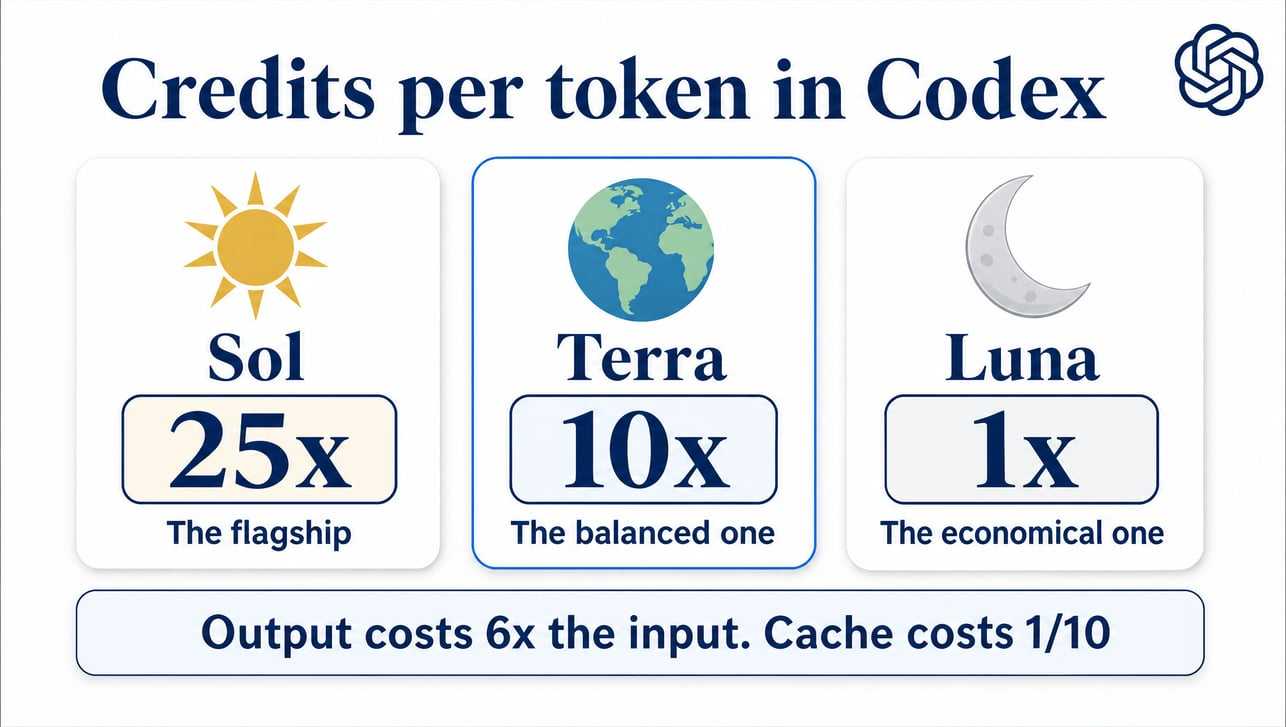
The infographic above shows the July table, for the GPT-5.6 family, when Sol cost 25x Luna. The current lineup's proportions are in the text table.
The July 30 history: on that day OpenAI cut prices for the GPT-5.6 family: Terra became 20% cheaper and Luna 80% cheaper on the API, with the cut also reflected in subscription usage. The Codex rate card that day charged 125 / 12.5 / 750 for GPT-5.6 Sol. In November, GPT-5.6 Sol appears at 100 / 10 / 500 at a promotional price, and the GPT-6 generation became the cost reference.
The formula that explains Codex credit usage
Since output costs 5x input on all recommended models, any run can be summarized in a weighted unit:
W = I + k × C + 5 × O

I = non-cached input tokens
C = cached input tokens
O = output tokens, including reasoning
k = 0.1 on GPT-6 Astra and GPT-6 Luna; 0.05 on GPT-6.1 Sol and GPT-6.1 Terra

Credits = W × the model's input rate ÷ 1,000,000
Example: a task that reads 100,000 new tokens and produces 20,000 output and reasoning tokens has W = 200,000. The cost on the four models:
| Model | Credits for the same run |
|---|---|
| GPT-6 Luna | 0.5 |
| GPT-6.1 Terra | 5 |
| GPT-6.1 Sol | 10 |
| GPT-6 Astra | 50 |
This table carries the most important lesson in the guide: with the same volume of tokens, the same task costs 100x more on Astra than on Luna, and 20x more on GPT-6.1 Sol. Reasoning effort does not change the rate; it changes the O in the formula. Raising the effort on a cheap model usually costs less than lowering the effort on an expensive model.
Reasoning effort: the second lever
Codex reasoning effort defines how many tokens the model dedicates to thinking before answering. It does not change the rate per token: it changes the volume of output tokens, so the same level costs very different amounts on Luna, Terra, Sol and Astra.
In the Nov 2026 documentation, the levels are Light, or low in the CLI, then Medium, High and Extra High, and above them Max and Ultra. OpenAI recommends starting at the client's default effort on GPT-6.1 Sol, at High on Luna and at Light on Astra, and warns that the levels do not map exactly across generations: GPT-6's High is not necessarily equivalent to GPT-5.6's High. In X-Apps guides we call the first level Low and the maximum level Max, for consistency with the other articles in the series.
The central point: there is no official table of "how much each effort level costs". Extra High does not cost "2x Medium"; it just tends to spend more reasoning tokens, and each token follows the model's rate. The realistic map of the intersections:
| Model \ effort | Low | Medium | High | Extra High | Max | Ultra |
|---|---|---|---|---|---|---|
| GPT-6 Luna | 1x, few tokens | 1x | 1x, more tokens | 1x, many tokens | 1x, one agent thinking longer | not available |
| GPT-6.1 Terra | 10x, few tokens | 10x | 10x, more tokens | 10x, many tokens | 10x, one agent thinking longer | 10x, multi-agent, if available |
| GPT-6.1 Sol | 20x, few tokens | 20x | 20x, more tokens | 20x, many tokens | 20x, one agent thinking longer | 20x, multi-agent |
| GPT-6 Astra | 100x, few tokens | 100x | 100x, more tokens | 100x, many tokens | 100x, one agent thinking longer | 100x, multi-agent |
The documentation explicitly says GPT-6 Luna goes up to Max but has no Ultra. On the others, Ultra depends on an eligible account and a supported model; the November 2026 documentation does not list which models have Ultra beyond excluding Luna, so check your selector.
Two practical consequences that surprise newcomers:
- Luna Extra High can be much cheaper than Terra Low. To tie in credits, Luna would need to spend 10x more weighted tokens on the same task, which rarely happens.
- Terra Ultra, where available, can end up more expensive than Sol Extra High. GPT-6.1 Sol's rate is 2x GPT-6.1 Terra's; if the Ultra agents together generate more than 2x the tokens, the math flips.
Codex Ultra: what automatic delegation does to your credits
Codex's Ultra mode is not "one effort level above Max". The official documentation describes it as maximum reasoning with permission for ChatGPT to delegate on its own parts of the work to subagents running in parallel; at the other levels, you need to ask for subagents explicitly. The same documentation warns that flows with subagents consume more tokens than a comparable run with a single agent. In the evaluations published in July for GPT-5.6, Ultra ran with 4 agents by default (there were published configurations with up to 16); the Nov 2026 documentation does not set a number and lets Codex choose the default when you do not configure the concurrent agent limit.
The gain exists and was measured in the previous generation: in the GPT-5.6 announcement, Sol in Ultra mode raised Terminal-Bench 2.1 from 88.8 to 91.9 and BrowseComp from 90.4 to 92.2. It is a gain of a few points that can multiply the task's spending, so the right decision depends on the shape of the work, not its difficulty as such.
Use Ultra when all four conditions are present:
- You can name at least three independent workstreams.
- Each workstream produces a useful result without waiting for the others.
- Most of it is reading, exploration, testing or comparison, not editing the same files.
- Finishing faster and covering everything is worth more than saving credits.
Prefer a single agent (Extra High or Max) when:
| Signal | Why |
|---|---|
| Each step depends on the previous one | There is no real parallelism to exploit |
| All agents would touch the same files | Risk of competing solutions and conflicts |
| There is a single authenticated browser session | Shared state calls for a single owner |
| The cause needs to be traced end to end | Splitting breaks the chain of evidence |
| The result needs a single voice | One central agent preserves coherence |
| There is already a diagnosis and only implementation is left | Ultra would only add overhead |
Codex Max: the maximum depth of a single agent
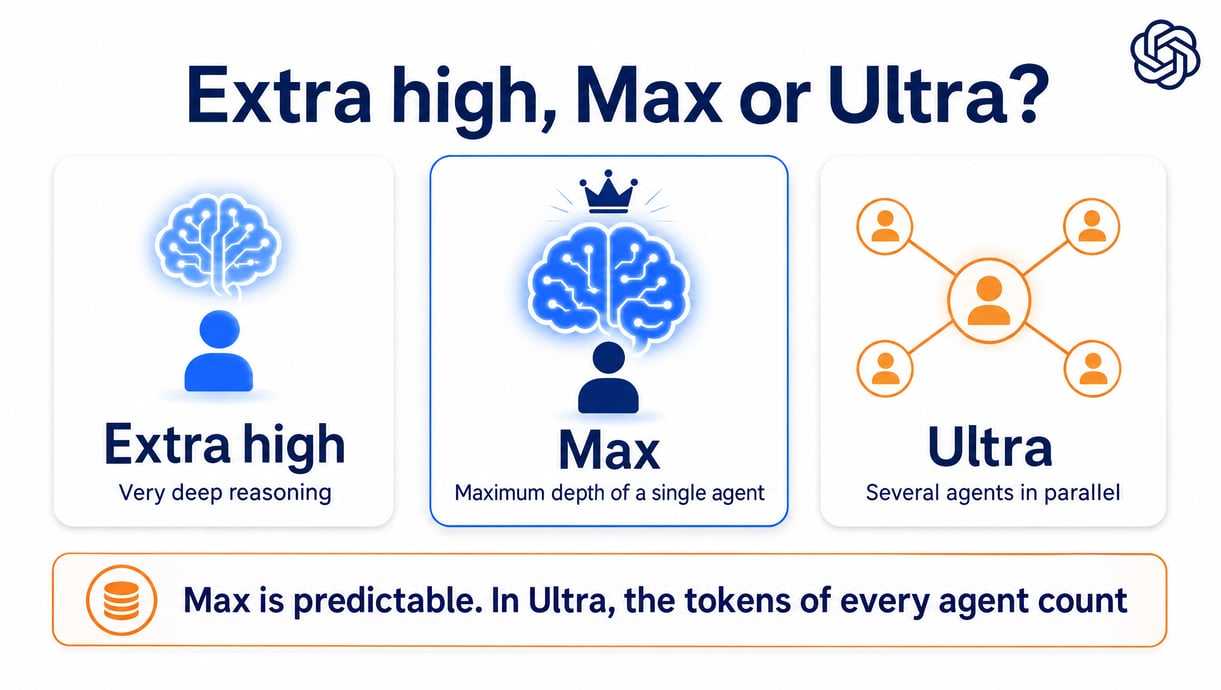
Between Extra High and Ultra there is a level many people have not yet seen in the selector: Max. The full depth scale works like this:
- Extra High: very deep reasoning by one agent.
- Max: the chosen model gets more time to reason about a single task.
- Ultra: maximum reasoning with automatic delegation to subagents.
For the credit math, the distinction matters: Max has no rate of its own. It costs more because it generates many more reasoning and verification tokens, but usage stays limited to one agent, which makes it much more predictable than Ultra. The official guidance is to reserve it for the hardest problems, when depth matters more than speed or usage; the documentation itself points out that most tasks need neither Max nor Ultra.
If the problem is indivisible and very hard, the natural escalation is High, Extra High and only then Max. If the problem can be split into workstreams, the path is Ultra. Getting this classification wrong is expensive both ways: Max on a parallelizable task wastes time; Ultra on a linear task wastes agents.
The Max margin: when a smaller model beats a bigger one
Max creates the most interesting intersections in the rate table: a cheap model reasoning at maximum versus an expensive model reasoning a little. The arithmetic of the Nov 2026 rate card defines the margin of each matchup:
| Matchup | Margin of the smaller model |
|---|---|
| GPT-6.1 Sol Max versus GPT-6 Astra Low | Can spend up to 5x the tokens and still tie |
| GPT-6.1 Terra Max versus GPT-6.1 Sol Low | Can spend up to 2x the tokens |
| GPT-6 Luna Max versus GPT-6.1 Terra Low | Can spend up to 10x the tokens |
| GPT-6 Luna Max versus GPT-6.1 Sol Low | Can spend up to 20x the tokens |
The calculation uses input and output, where the proportions are exact. In a cache-dominated task, the margin between Luna and the 6.1 models shrinks by half, because the 6.1 cache has a bigger discount.
And it is not just theory. In the results OpenAI published in July for GeneBench-Pro, a hard benchmark of quantitative analysis in biology, the crossover showed up in practice in the GPT-5.6 generation: Terra Max scored 23.3% against 14.4% for Sol at low effort, and Luna Max scored 16.5%, also above Sol at low effort, while spending about 21 times more reasoning tokens. At the July rates, when Sol cost 25x Luna, Luna Max delivered a better result while costing roughly 16% fewer credits than Sol at low effort; Terra Max, on the other hand, ended up almost 4 times more expensive, because its margin was only 2.5x. OpenAI did not publish this measurement for the GPT-6 lineup. The method lesson stands: with the current 20x margin between GPT-6 Luna and GPT-6.1 Sol, the same 21x ratio in tokens would no longer come out cheaper.
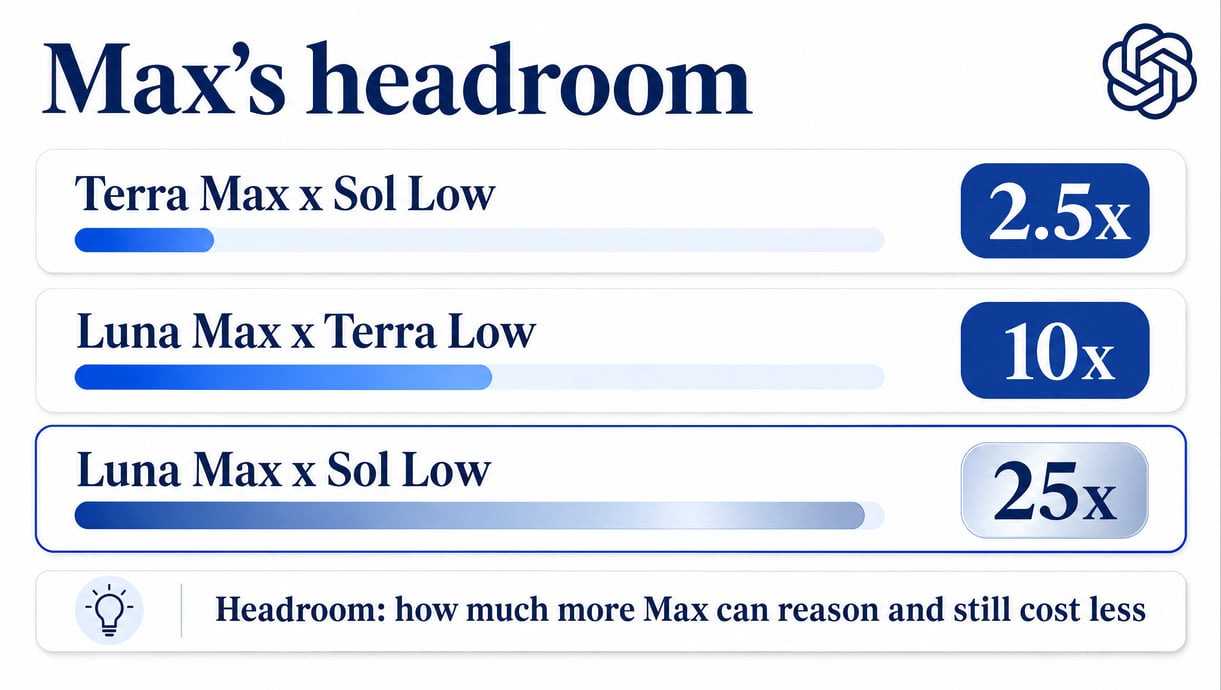
The infographic above uses the July margins (2.5x, 10x and 25x). The current margins are in the text table.
The right way to read these intersections:
- Luna Max shines on closed, text-based, verifiable tasks: implementation with objective tests, data transformation with clear rules, auditing against a checklist. The 20x margin against GPT-6.1 Sol leaves a huge amount of room to reason cheaply.
- Terra Max is the deep investigation specialist: a hard causal bug, a delicate sequential migration, an extensive logical analysis. But be careful using it as a "cheap Sol": the 2x margin runs out fast.
- Sol Max is the alternative to Astra: OpenAI describes GPT-6.1 Sol as performance close to Astra at a lower cost, and the 5x margin lets it reason quite a lot before tying.
- Effort does not replace the model where capability rules. In visual navigation, very long context and polish, the gap between models is structural: in the numbers published for the GPT-5.6 generation, Terra held 89.6% at 256,000 to 512,000 tokens of context, while Luna stayed at 41.3%. No Max makes up for a gap of that size. For Chrome and Computer Use, choose the model before the effort.
Where Max appears (and what to do when it is missing)
Max has an operational quirk that causes frequent questions: it may not appear in the selector, depending on the app, the version and the settings. In July, the documentation advised enabling it in the settings when it was missing. What worked in practice:
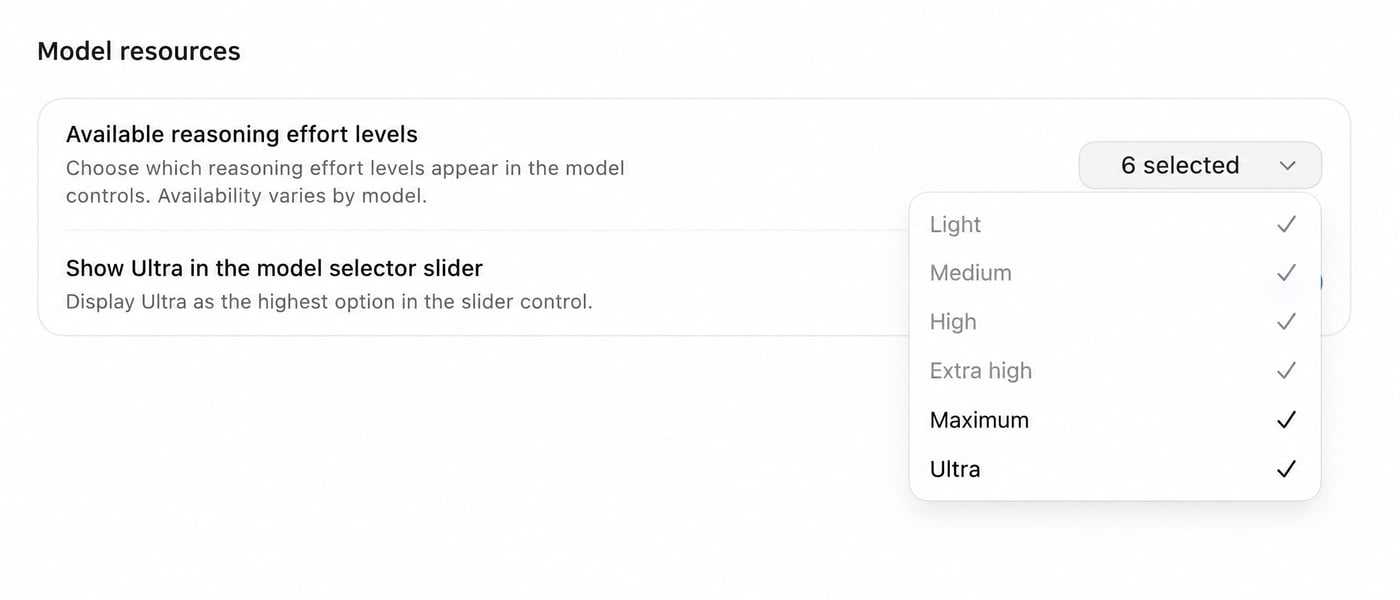
- Enable it in the app settings: the path was Settings → Model features → Available reasoning efforts (in the Portuguese app, Configuração → Recursos do modelo → Esforços de raciocínio disponíveis). Open the list and check Max and Ultra; with everything on, the selector shows "6 selected", as in the screen below. There is also a separate setting, "Ultra in the model selector slider", that shows Ultra as the highest option on the slider. Then quit the app and create a new task, because model and effort are tied to the current task.
 2. Use the advanced selector, not the summarized power control: there were reports in the official Codex repository that the simplified slider jumped from Extra High straight to Ultra even with Max enabled. The reliable path was Advanced → Effort. In Nov 2026, the documentation started describing power presets with ready-made combinations of model and effort (Luna High, GPT-6 Sol Light, GPT-6 Sol Medium, Astra Light, Astra Medium and Astra Extra High).
3. In the CLI, Max became official in July: from version 0.144.0, the
/model command started showing the full sequence, including Max between Extra High and Ultra. Check in your current client, because the path may have changed since then.
4. Different clients, different catalogs: Codex has been part of the ChatGPT desktop app since July 2026, and the iPhone, desktop and CLI interfaces have their own update cycles. The catalog also changes by client: as of Nov 2026, the documentation lists GPT-6.1 Terra in the desktop app, in Work on the web and in the CLI, but not in the IDE extension.
A little-known middle option: controlled subagents outside Ultra. At any effort level, you can explicitly ask "use two subagents, one for the logs and another for the database, without changing anything, and consolidate". In local clients, you can go further and configure subagents with their own model and effort in TOML files (~/.codex/agents/ for personal agents or .codex/agents/ in the project). The Nov 2026 documentation suggests parallel agents for reading tasks (exploration, tests, triage, summaries), GPT-6 Luna for fast, narrowly scoped agents and GPT-6.1 Sol for ambiguous, multi-step work that calls for planning and validation. This setup usually comes out cheaper than an Ultra on the strong model, because the expensive model is not spent on routine investigation.
What happened to Codex Spark
In the first version of this guide, GPT-5.3 Codex Spark was the special case in the credit math: in research preview for Pro subscribers, it had its own limits, outside the allowance and the balance, which made small, interactive changes done on it the cheapest in the subscription.
That shortcut is gone. Spark was retired on September 14, 2026 and is no longer available in the ChatGPT desktop app, the Codex CLI or the IDE extension. OpenAI asks that saved settings, custom agents and scripts that select gpt-5.3-codex-spark switch to an available model. For the small, interactive work that used to go to Spark, the natural candidate on cost today is GPT-6 Luna, which has the lowest rate in the table; if the wait bothers you, Fast mode solves it, with the surcharge described below.
Fast mode and Ultrafast: the same model with a speed surcharge
Fast mode serves the same model faster. As of Nov 2026, it applies to GPT-6.1 Sol, GPT-6.1 Terra, GPT-6 Astra, GPT-6 Sol and GPT-6 Luna, where available, and to GPT-5.6 with a 1.5x speed gain. Usage changes depending on where it is drawn from: 2.5x the standard rate on the plan allowance and 2x on purchased credits (and on Enterprise pay-as-you-go). In the CLI, the command is /fast.
Ultrafast is the next step, only on GPT-6 Astra and GPT-6.1 Sol: on Astra, it generates tokens up to 8x faster than in Standard mode. It is available on the US$ 500 Pro plan and on eligible Enterprise and Edu plans, and costs 8x the standard rate on the allowance and 6x on purchased credits. The plan details are in our article on ChatGPT Pro at US$ 500 and Ultrafast.
The comparisons that matter
Luna Extra High vs Terra Low vs Terra Medium
The tie condition is objective: GPT-6 Luna Extra High only costs the same as GPT-6.1 Terra if it spends 10x more weighted tokens. Therefore:
| Priority | Choice |
|---|---|
| Lowest cost per task | Luna Extra High |
| Best overall balance | Terra Medium |
| Lowest latency on the Terra model | Terra Low |
Terra Low is the hardest setting to justify: to save money, Luna Extra High wins; for reliability, Terra Medium wins. Use it when you specifically want Terra with the shortest possible wait.
Terra Ultra vs Sol High and Extra High
Where the selector offers Ultra on GPT-6.1 Terra (the Nov 2026 documentation does not confirm it), it is not "a cheaper Sol". It buys coverage and parallelism (audits of many modules, research across many sources, tests in several environments). Sol High and Extra High buy judgment and depth (the hard bug, the architecture decision, the delicate browser flow). With GPT-6.1 Sol's rate at only 2x GPT-6.1 Terra's, for a hard linear task Sol High tends to beat Terra Ultra on both quality and cost, because it avoids multiplying agents.
Sol High vs Sol Extra High vs Sol Max vs Astra
Same rate for the first three, very different usage; Astra comes in as the model step, not the effort step:
| Configuration | When to use | Efficiency |
|---|---|---|
| GPT-6.1 Sol High | Default for hard work: complex bugs, architecture, analysis, browser | Best ratio in the current lineup |
| GPT-6.1 Sol Extra High | When High failed or the cost of being wrong exceeds the cost of reasoning more | Good on critical problems |
| GPT-6.1 Sol Max | The hardest problem in the queue, indivisible, where quality comes before cost | Expensive but predictable: a single agent |
| GPT-6 Astra Low | When Sol Max could not handle it and the work requires the judgment of the most capable model | Rate 5x Sol's; start at Low (Light in the app), as OpenAI recommends |
| Sol or Astra Ultra, where available | Only for large work divisible into independent workstreams | Low on linear tasks |
To "improve a single answer a bit", Ultra is the worst choice in the table: it pays for several agents for a one-agent problem. Between Max and Ultra, the decisive question is not "how hard" but "how many independent workstreams".
Matrix by type of work
The matrix below starts from cost: it is the lowest credit spend that usually solves each type of task in the Nov 2026 lineup. To choose by model capability, the reference is the Codex models page, and our guide to Sol, Terra and Luna records the logic for the GPT-5.6 generation.
| Task | Recommended configuration |
|---|---|
| Quick changes while coding | GPT-6 Luna Low or Medium (Fast mode if the wait bothers you) |
| Small, localized bug | GPT-6 Luna High |
| Clear, bounded implementation | GPT-6 Luna Extra High |
| Well-specified code with objective tests | GPT-6 Luna Max |
| Everyday development in a repository | GPT-6.1 Terra Medium (outside the IDE extension) or GPT-6.1 Sol at the client default |
| Complex refactoring or debugging | GPT-6.1 Sol High |
| Deep causal investigation with closed evidence | GPT-6.1 Terra Max |
| Architecture and critical problems | GPT-6.1 Sol Extra High or Max; GPT-6 Astra if Sol cannot handle it |
| Audit of many modules | GPT-6.1 Terra Ultra, where available, or controlled Luna subagents |
| Rewriting and short text | GPT-6 Luna Low or Medium |
| Important executive document | GPT-6.1 Sol High |
| Research across many parallel sources | GPT-6.1 Terra Ultra, where available |
| Repetitive browser automation | GPT-6 Luna or GPT-6.1 Terra Medium |
| Important visual flow in Chrome | GPT-6.1 Sol High |
| Long, fragile flow with error recovery | GPT-6.1 Sol Extra High |
For computer and browser use, there is an indirect cost warning: in the GPT-5.6 generation, the official benchmarks showed a much bigger gap between models on OSWorld 2.0 (Sol 62.6 against 45.6 for Luna) than in programming (SWE-Bench Pro: 64.6 against 62.7). A cheap model that gets navigation wrong generates new screenshots, new attempts and more calls: the savings per token can be wiped out by repeating the flow. OpenAI now positions GPT-6.1 Terra precisely for writing, visual understanding and computer use.
Three flows that spend less than a continuous Ultra
The biggest waste happens when an expensive configuration stays on from start to finish. Staged flows solve this:
- Explore broadly, decide deeply: Terra Ultra (where available) or Luna subagents to gather evidence in parallel (audit, research, comparison); then GPT-6.1 Sol Extra High for the decision, the diagnosis or the final document with a single voice.
- Plan, execute in parallel, integrate: GPT-6.1 Sol Extra High defines architecture, contracts and acceptance criteria; subagents execute the already specified workstreams; Sol integrates and validates at the end.
- Investigate in parallel, fix centrally: in an incident, read-only agents sweep logs, database, API and deploy at the same time; a single GPT-6.1 Sol Extra High picks the hypothesis, applies the patch and runs the regression.
The logic of all three is the same: parallelize reading, centralize writing and reserve the expensive model for decisions.
30-second checklist before running
- Is the task interactive and small? GPT-6 Luna, at low or medium effort.
- Is it simple and well specified? Luna, raising the effort if there is ambiguity (OpenAI suggests starting at High).
- Is it normal production work? GPT-6.1 Terra Medium or GPT-6.1 Sol at the default effort.
- Is it hard, critical or ambiguous? GPT-6.1 Sol High, and Extra High if mistakes are costly.
- Could Sol not handle it? GPT-6 Astra, starting at Low; it costs 5x Sol per token.
- Is it a single, closed, verifiable problem? A smaller model on Max may beat a bigger one at low effort.
- Are there three or more independent workstreams? Consider Ultra, on the smallest model that can handle each workstream (Luna has no Ultra).
- Will you reuse a lot of context? Keep the same session to take advantage of cache at 1/10 or 1/20 of the price.
- Do you only need speed? Remember that Fast mode costs 2.5x on the allowance (2x on credits) and Ultrafast 8x (6x on credits).
Frequently asked questions about Codex credits
How much does a task cost in Codex?
It depends on the model, the effort and the context. As of Nov 2026, OpenAI estimates 5 to 45 local messages per 5-hour Plus window on GPT-6 Astra, 15 to 160 on GPT-6.1 Sol, 35 to 285 on GPT-6.1 Terra and 350 to 3,000 on GPT-6 Luna, and warns that these are not fixed limits. For GPT-5.6 Sol, from the previous generation, the estimate is 2 to 15 credits per typical task. The exact value for your account appears in Codex Settings, on the Usage tab.
Where can I see how much I am spending?
In Codex Settings → Usage (chatgpt.com/codex/settings/usage), which shows the plan allowance, recent usage and the balance of purchased credits.
Does raising the reasoning effort double the cost?
There is no fixed multiplier. Effort increases reasoning tokens, charged as output at the model's rate. The real increase varies by task; with clear, deterministic instructions, the gain can be almost nil and the extra cost high.
How many times more does Ultra cost?
There is no published multiplier. Ultra runs maximum reasoning and can delegate to subagents on its own, and all tokens count; the documentation warns that flows with subagents spend more tokens than a single-agent run. On a parallelizable task, the extra cost buys time and coverage; on a linear task, it is waste.
Do Max and Ultra cost the same?
Neither has a rate of its own; both pay the model's rate for the tokens generated. The difference is in the shape of usage: Max gives more reasoning time to a single agent, so spending grows, but in a limited, predictable way. Ultra adds up the tokens of several agents, and the total varies a lot with the task.
Max does not appear in my selector. What now?
In July 2026, the path was Settings → Model features → Available reasoning efforts, checking Max (and Ultra, if you want) in the list, and creating a new task. If the summarized power control jumped from Extra High to Ultra, the advanced effort selector solved it; in the CLI, /model started showing Max from version 0.144.0. This path was not reconfirmed in Nov 2026, so check in your current client. Mobile, desktop and CLI interfaces update at different paces, so the level may appear in one client before another.
Is Luna with high effort more expensive than Terra with low effort?
Almost never. GPT-6.1 Terra's rate is 10x GPT-6 Luna's, so Luna would need to spend 10x more weighted tokens to tie. If the task is well specified, Luna Extra High is usually the most economical option in the selector.
Does Spark still exist?
No. GPT-5.3 Codex Spark was retired on September 14, 2026 and left the desktop app, the CLI and the IDE extension. Anyone who had gpt-5.3-codex-spark in a configuration, custom agent or script needs to switch to an available model. The separate quota it had in research preview ended with it.
Are Fast mode and Ultrafast the same thing?
No. Both serve the same model faster, but Fast mode applies to the GPT-6.x models and to GPT-5.6 (with a 1.5x gain) and costs 2.5x on the allowance (2x on credits), while Ultrafast exists only on GPT-6 Astra and GPT-6.1 Sol, on the US$ 500 Pro plan and on eligible Enterprise and Edu plans, and costs 8x on the allowance (6x on credits).
Was GPT-5.6 retired?
No. As of Nov 2026 the credits table still charges GPT-5.6 Sol, Terra and Luna, but they are the previous generation and are not on the list of recommended models for Codex. The models retired for ChatGPT sign-in are different ones: GPT-5.3 Codex Spark (September 14, 2026), gpt-5.4 and gpt-5.4-mini (August 31, 2026) and GPT-5.5 (October 14, 2026). Anyone using Codex with an API key follows the API's rules and models.
Do purchased credits expire?
On personal plans, yes, in 12 months, and they are non-refundable, with some exceptions. Work and Codex share the same usage: ChatGPT Work draws from the same allowance and the same credits.
Do the July 30, 2026 prices still apply?
For the GPT-5.6 family, only in part: Terra and Luna remain at 50 / 5 / 300 and 5 / 0.5 / 30, and Sol appears at 100 / 10 / 500 at a promotional price (it was 125 / 12.5 / 750 in July). But the cost reference is now the GPT-6 lineup, with proportions of 100x, 20x, 10x and 1x. Confirm the current values on the official page before doing fine-grained math.
Does cache really save money?
Yes: reading cached input costs 1/10 of normal input on Astra and Luna, and 1/20 on GPT-6.1 Sol and GPT-6.1 Terra. Codex credit billing does not charge cache writes separately, so working in the same session, instead of opening new conversations with the same context, is one of the easiest savings to capture.
Conclusion
You do not save Codex credits by choosing "the weakest model", but by aligning the three levers with the shape of the task: rate (model), tokens (effort) and execution architecture (single agent or Ultra). The pattern that emerges from the Nov 2026 tables is simple: GPT-6 Luna for interactive and bounded work, GPT-6.1 Terra Medium or GPT-6.1 Sol at the default as the base, Sol High for what matters, Extra High for what is critical, Max for the hardest indivisible problem in the queue, Astra when Sol is not enough and Ultra only when you can name the workstreams the subagents will execute. And remember the most profitable intersection in the rate card: a smaller model on Max, with a 10x or 20x margin to reason, can deliver more cheaply what a bigger model would do at low effort.
To choose the model by capability, see the Codex models page and our guide to Sol, Terra and Luna. To organize the whole subscription process, see how to get more out of ChatGPT and Codex without spending more. And if your company is structuring AI agents in production, the same per-token cost discipline applies to any provider.
Want to put AI to work with costs under control?
X-Apps designs AI flows for companies with cost governance from day one: model selection, routing by task, caching, usage observability and agents in production.
Official sources and documentation
- Pricing - ChatGPT Learn (Codex and Work pricing page, read on November 10, 2026)
- Models - ChatGPT Learn (read on November 10, 2026)
- Speed - ChatGPT Learn (Fast mode and Ultrafast, read on November 10, 2026)
- Subagents - ChatGPT Learn (read on November 10, 2026)
- Codex rate card - OpenAI Help Center (July 2026 version)
- Using credits for flexible usage in ChatGPT - OpenAI Help Center
- Using Codex with your ChatGPT plan - OpenAI Help Center
- Reasoning guide - OpenAI API
- GPT-5.6 announcement - OpenAI
- Advancing the price-performance frontier with GPT-5.6 - OpenAI
- Introducing GPT-5.3-Codex-Spark - OpenAI (historical; model retired on September 14, 2026)
- GPT-5.6 in ChatGPT - OpenAI Help Center