
Índice do artigofaltam 7 min de leitura
A slow pipeline is almost never "just a lack of CPU".
In practice, small teams suffer from three recurring pain points:
- Jobs waiting in a queue because they landed on the "wrong" runner (or on the "right" runner, but it is full).
- Builds repeating work because the cache does not exist, is misconfigured, or is invalidated on every commit.
- Docker builds always starting "from scratch" because the layer cache is not being reused.
This guide is a step-by-step plan to tackle these pain points without relying on "miracles" and without creating a fragile CI/CD setup.
- If you use GitLab CI/CD, GitHub Actions, or both, this post covers the concepts and gives examples for both.
- If you have builds on ARM64 (Graviton / Apple Silicon) and x64, there is a specific section here to avoid architecture pitfalls.
CI/CD series map
- Git CI/CD guide for small teams: performance, cache and runners
- GitLab CI: runner tags and job routing
- Cache in CI/CD: how to design keys and avoid invalid cache (GitHub and GitLab)
- Docker layer caching in CI: BuildKit, buildx, cache-from and cache-to
- Dedicated CI/CD runner: when it pays off and how to plan it in a small team
- macOS runners in CI: Intel vs Apple Silicon, costs and pitfalls
1) Quick diagnosis: is the bottleneck the queue or the execution?
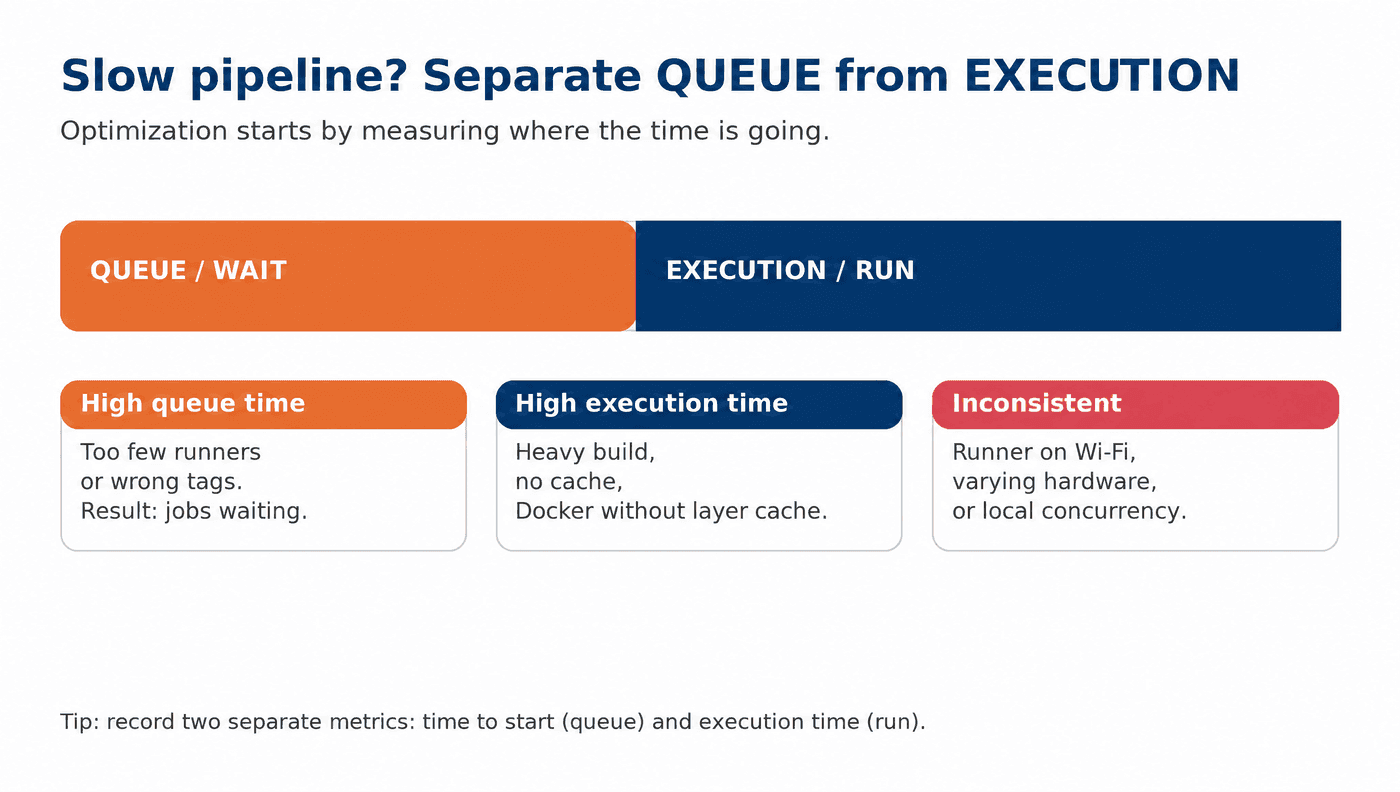
Before optimizing, you need to separate two metrics.
- Queue time: the time between the job being created and actually starting.
- Run time: the real time the job spent running.
This matters because the fixes are different:
- High queue time → a capacity or routing problem (runners).
- High run time → a build problem (cache, Docker layers, dependencies, parallelism).
1.1 How to measure without extra tools
-
Open the job log and note:
- creation time
- start time
- end time
-
Calculate:
- queue = start - creation
- run = end - start
-
Do this for 5 to 10 runs (not just one). A pipeline that is "slow sometimes" is almost always concurrency + a shared runner + network or hardware variation.
1.2 Rule of thumb for small teams
- If the queue is > 30% of total time, stop "optimizing the build" and start with runners.
- If run time is > 70% of total time, your biggest ROI tends to be cache and Docker layer caching.
2) Runners: how to avoid jobs on the "wrong" runner
The classic symptom is: "sometimes it is fast, sometimes it waits 10 minutes".
This usually happens when:
- There are no criteria to route jobs (tags/labels).
- There is a "generic" runner accepting everything (including heavy jobs).
- The pipeline depends on development machines (Wi‑Fi, local use, hardware variation).
2.1 GitLab: runner tags (and what almost everyone gets wrong)
In GitLab, CI/CD tags control which jobs a runner can execute (not to be confused with Git tags on commits). A job only runs on a runner that has all the tags defined in the job. If the runner is configured to run only tagged jobs, untagged jobs can get "stuck".
Further reading in this series:
Example of a job with a dedicated tag:
build_web:
  stage: build
  tags:
    - linux-x64
    - docker
  script:
    - npm ci
    - npm run build
Good practices for a small team:
- Use few tags, with a clear meaning (e.g.
linux-x64,linux-arm64,macos,docker). - Avoid "generic" tags that become a dumping ground (e.g.
build,runner1). - Define a "default" runner only for light jobs (lint, quick tests), and separate runners for heavy builds.
2.2 GitHub Actions: runs-on, labels and runner groups
In GitHub Actions, you route execution with runs-on. For self-hosted runners, you can use labels and runner groups to segment who runs what.
Simple example (hosted runner):
jobs:
  test:
    runs-on: ubuntu-latest
    steps:
      - uses: actions/checkout@v7
      - run: npm test
Example with a self-hosted runner (labels):
jobs:
  build:
    runs-on: [self-hosted, linux, x64, build-heavy]
    steps:
      - uses: actions/checkout@v7
      - run: ./ci/build.sh
Watch the action versions on self-hosted runners. Since v5, actions/checkout and actions/cache run on Node.js 24 and require Actions Runner 2.327.1 or newer (a requirement published in the v5 releases of each). Before bumping the action version in the workflow, check the release notes for the minimum runner of the version you will use and update the self-hosted runner first.
Further reading in this series:
3) Cache in CI/CD: fast dependencies and predictable builds
Cache is not a "magic accelerator". It is a contract.
- If the cache "hits", you save minutes.
- If the cache "gets it wrong", you create hard bugs (old artifact, incompatible dependency, contaminated build).
Further reading in this series:
3.1 Cache vs artifacts: do not mix them
- Cache: reuse of dependencies and directories that can be rebuilt (e.g. npm/pnpm cache, Gradle, pip).
- Artifacts: build output that will be consumed by another job (e.g. the
dist/folder, binaries, reports).
Rule of thumb: if another job needs the file "as a result", use an artifact. If it is only to speed up repetition, use cache.
3.2 GitHub Actions: key and restore-keys (the basics that solve 80%)
A good cache key usually includes:
- OS and architecture
- Lockfile hash
- Runtime version (when needed)
Example for Node (dependency cache):
- name: Cache npm
  uses: actions/cache@v6
  with:
    path: ~/.npm
    key: ${{ runner.os }}-${{ runner.arch }}-npm-${{ hashFiles('**/package-lock.json') }}
    restore-keys: |
      ${{ runner.os }}-${{ runner.arch }}-npm-
Common mistakes:
- Caching "large and unstable" directories (e.g.
node_modules) without criteria. - Forgetting the architecture in the key (it breaks when you have ARM and x64).
- Including "the commit" in the key (it invalidates every time and is useless).
3.3 GitLab CI/CD: cache key and fallback_keys
In GitLab, you can use cache:key and fallback keys to reuse cache even on new branches (when it makes sense).
Example:
cache:
  key: "node-${CI_RUNNER_EXECUTABLE_ARCH}-${CI_COMMIT_REF_SLUG}"
  paths:
    - .npm/
  fallback_keys:
    - "node-${CI_RUNNER_EXECUTABLE_ARCH}-main"
    - "node-${CI_RUNNER_EXECUTABLE_ARCH}-default"
Tips:
- Separate cache by architecture (
CI_RUNNER_EXECUTABLE_ARCHor an equivalent variable). Careful: GitLab's documentation warns that this variable carries the OS and architecture of the runner executable, which may not be the same environment as the executor. If the job runs in a container of another architecture, prefer your own variable, defined in the job alongside the architecture tags (for examplevariables: { ARCH: arm64 }) or in theenvironmentof the runner'sconfig.toml. - Use fallback to "grab the main branch cache" when the branch is new (good for dependencies).
- Avoid fallback for build outputs (that is an artifact, not cache).
4) Docker layer caching: when the build "eats" the pipeline
If your pipeline runs docker build and takes a long time, there are two scenarios:
- You are rebuilding layers that could be reused.
- Your Dockerfile invalidates the cache early (e.g. it copies the whole repo before installing dependencies).
Further reading in this series:
4.1 First: fix the Dockerfile
Golden checklist (multi-stage and cache friendly):
- Copy only the manifests first (e.g.
package.json,package-lock.json). - Install dependencies.
- Only then copy the rest of the code.
- Separate build and runtime (multi-stage).
Example (Node):
FROM node:24 AS build
WORKDIR /app
COPY package*.json ./
RUN npm ci
COPY . .
RUN npm run build
FROM nginx:alpine
COPY /app/dist /usr/share/nginx/htmlPin the base image to a supported LTS version. Node.js 20 reached end of life on April 30, 2026 and no longer receives security fixes. As of November 2026, Node.js 24 is in maintenance until April 2028 and Node.js 26 became active LTS on October 28, 2026. Check the official schedule before switching versions.
4.2 Then: use layer cache in CI
Two common strategies:
- Registry cache (recommended): the cache goes back and forth through the registry.
- Local cache (good for a dedicated runner): the runner keeps layers locally.
A simple pattern is to use BuildKit/buildx with --cache-from and --cache-to pointing to the registry.
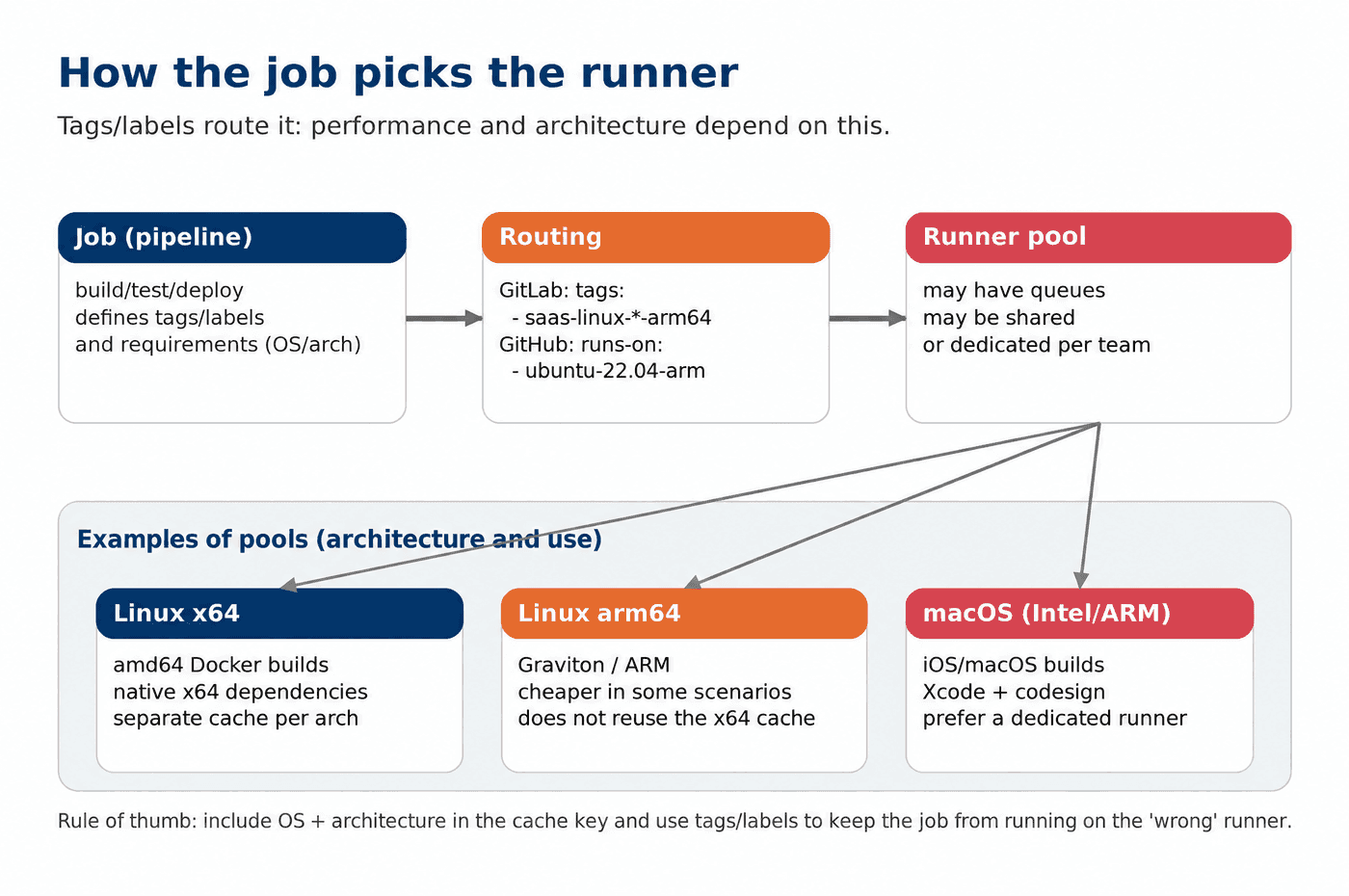
5) ARM64 vs x64: why it breaks the cache and (sometimes) the build
Architecture is not a detail.
If you have ARM64 and x64 runners running the same pipeline, it affects:
- Caches (native dependencies are not compatible across architectures).
- Docker images (they must exist for the architecture or use emulation, which is slower).
- Precompiled binaries (e.g. packages with native addons).
5.1 Practical rules to avoid pain
- Include the architecture in the cache key.
- Have explicit tags/labels per architecture.
- If you build multi-arch Docker images, treat it as a separate pipeline (or a matrix with a strategy).
Example (GitHub Actions with an arch matrix). The strategy key goes inside the job, never at the top level of the workflow:
jobs:
  build:
    strategy:
      matrix:
        arch: [x64, arm64]
    runs-on: ${{ matrix.arch == 'arm64' && 'ubuntu-24.04-arm' || 'ubuntu-24.04' }}
    steps:
      - uses: actions/checkout@v7
      - run: ./ci/build.sh
About hosted runner labels: on September 17, 2026 GitHub started deprecating ubuntu-22.04 and ubuntu-22.04-arm, which stop being supported on April 17, 2027. The current options are ubuntu-24.04 and ubuntu-26.04, with the -arm variants. ubuntu-latest is migrating to Ubuntu 26.04 between October and November 2026, so pin the OS version when the build depends on system packages.
Example (GitLab with tags per arch):
build_amd64:
  tags: [linux-x64, docker]
  script: ["./ci/build.sh"]

build_arm64:
  tags: [linux-arm64, docker]
  script: ["./ci/build.sh"]
6) macOS runners: when you need them and how to avoid pitfalls
A macOS runner usually comes in out of necessity:
- iOS/macOS builds (Xcode)
- codesign/notarization
- macOS-specific tests
Further reading in this series:
6.1 Quick tips
- Avoid running "generic" jobs on macOS: reserve it for what really needs it.
- Prefer a dedicated runner for macOS (high cost per hour, and queues hurt).
- Cache carefully (Xcode DerivedData can help, but it can also contaminate builds if shared without a strategy).
Final checklist: a 1-day plan to speed up your CI/CD
- Measure queue time vs run time over 5 to 10 runs.
- Define job "classes" (light, heavy, macOS, Docker build).
- Create clear tags/labels and remove the "dumping ground" runner that accepts everything.
- Separate cache by architecture (ARM64/x64) and by lockfile hash.
- Adjust the Dockerfile so it does not invalidate the cache early.
- Enable Docker layer caching (registry cache or local cache on a dedicated runner).
- Document "which job runs on which runner and why" (prevents regressions).
<request-a-quote title="Want a leaner pipeline to deliver better?" subtitle="Request a quote to structure CI/CD, cache and automation for your team."
References
- GitLab Docs: Configuring runners (tags, jobs tagged/untagged)
- GitLab Docs: Caching in GitLab CI/CD
- GitLab Docs: GitLab.com hosted runners on Linux (tags by size/architecture)
- GitLab Docs: Make Docker-in-Docker builds faster with Docker layer caching
- GitHub Docs: Caching dependencies and build outputs
- GitHub Docs: Choose the runner for a job
- GitHub Docs: GitHub-hosted runner reference
- GitHub Docs: Workflow syntax, job strategy and matrix
- GitHub runner-images: Ubuntu 22.04 deprecation (announcement #14254)
- GitHub runner-images: Ubuntu 26.04 generally available (announcement #14747)
- GitLab Docs: predefined CI/CD variables
- Node.js: release schedule and end of life
- Cover image: Xavier Cee (Unsplash)