Índice do artigofaltam 4 min de leitura
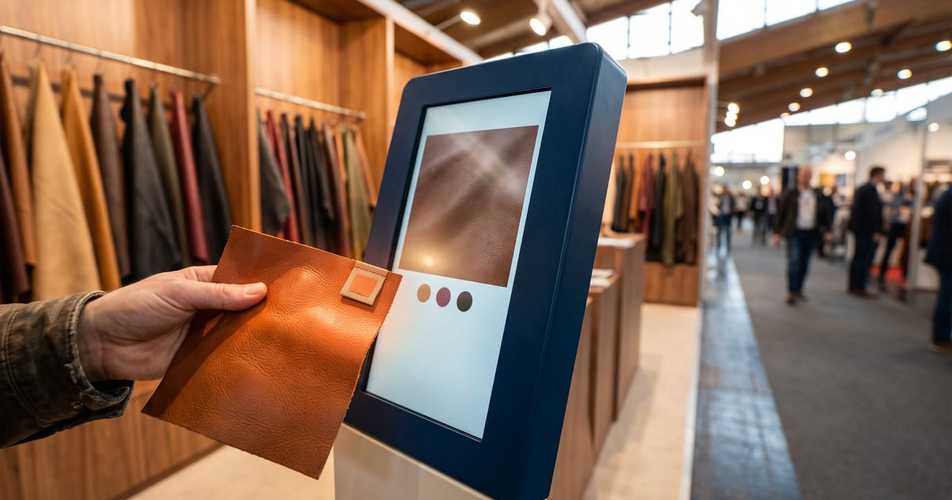
At a leather trade show, the visitor picks up a sample, feels the texture and wants to know the rest: thickness, finish, the colors that leather comes in. On the other side, the sales rep flips through a printed catalog looking for the right spec sheet, because the event's internet can't be trusted. JBS Couros takes its leather portfolio to showrooms and trade shows, and that is how the sales conversation used to stall, waiting for the right page. With the kiosk X-Apps built, the visitor shows the sample's code and the spec sheet opens on screen, without depending on the event's internet. According to the JBS Couros case study, the kiosk brought 3x more leathers looked up per visitor.
Sales happen exactly where the internet is worst
People who buy systems usually see them working in a meeting room, with a good network and someone from the team beside them to explain. JBS Couros' sales don't happen in that room. They happen in showrooms and at trade shows, in front of a huge portfolio and with a connection the event doesn't guarantee.
In that setting, a system that fetches every piece of information from the internet freezes exactly when the customer is waiting for the answer. The printed catalog survives without a network but costs time: finding the right page becomes manual work, and service slows down.
The same applies to many companies that have never set up a booth. In a mall store, on a construction site or in a delivery truck, the customer is there and the connection isn't always, and a system that only works with a good network leaves service stuck.
Before
The spec sheet depends on paper and the network- Printed catalog on the counter
- Searching page by page
- Event internet with no guarantee
- The rep explains every option
After
The spec sheet lives inside the kiosk- The entire catalog on the kiosk screen
- The visitor scans the code and the spec sheet opens
- The spec sheet opens even without a network
- The visitor finds what they are looking for on their own
At JBS Couros, the entire catalog travels inside the kiosk
What JBS Couros wanted was for visitors, leather in hand, to find on their own the information that keeps the sales conversation going, without depending on someone from the team to explain every possibility. The software for this kiosk, which goes to the brand's showrooms and trade shows, was built by X-Apps.
The decision that organizes the project is this: the kiosk asks the internet nothing during service. Before each event, the entire catalog, with every leather, its images and its spec sheet, is loaded into the device itself. During the show, the event network can drop as much as it likes, because the kiosk already carries everything it needs to answer.
For the visitor, the path is short. Each leather sample gets its own code, the same kind of QR code everyone already uses for Pix (Brazil's instant payment system) and restaurant menus. The kiosk reads the code on the sample the visitor is holding and opens that leather's spec sheet, with images, characteristics and available colors. The sample still shows texture, finish and color to the touch, and the screen brings the information that moves the conversation with the rep forward.
Those who arrive without a sample in hand also have a place to start. The first screen shows photos of leather and the two paths: scan a physical sample or browse the collections, which separate leathers for footwear, cars and furniture.
This choice has a price: the kiosk only knows what was loaded onto it. A new collection has to be put on the device before each trade show or showroom, and whatever changes during the event only reaches the kiosk before the next one. Whoever commissions a system like this needs to agree in advance who does that loading and how far ahead.
According to the case study, the time to find a material's spec sheet fell 50%.
Even Apple's services go down for a few hours
On Tuesday, November 17, Apple's official status page recorded that iCloud sign-in may have been slow or unavailable and that some users couldn't make purchases on the App Store. Everything was resolved the same day.
If even Apple goes a few hours with services failing for some customers, the system you hire will also stop at some point, whether because the vendor's servers went down or because the local internet disappeared. In both cases, a system that asks the internet on every lookup leaves your salesperson without an answer with the customer standing right there.
That is why, before commissioning a system, ask where it will be used and what needs to keep working when the network drops. At JBS Couros, it was opening the leather's spec sheet. At your company, it may be checking a price, recording an order, viewing the customer's history or clocking the team in. Whatever is essential is stored on the device; whatever can wait, like sending the order to the office, goes through when the connection comes back.
A test to do today, without calling anyone
Pick up the phone or tablet your team uses in front of customers and open the everyday system: the catalog, the price list, the order app. Turn on airplane mode and try to do what the salesperson does on a visit, such as finding a product, showing its spec sheet and taking an order.
Notice what opens and what stays blank. See whether the system tells you it is offline or just freezes with the spinner going round. If you can enter anything, turn airplane mode off and check whether what was typed reached the office or got lost along the way.
If the answer the customer expects depends on the network, ask whoever will build your next system what keeps working on the device when the network drops and how new content gets onto it. Where the internet fails, the system has to carry with it what it needs to work.
Sources: X-Apps case study page JBS Couros: kiosk software for showrooms; Apple System Status, Apple's official status page. Read on November 18, 2026.