Índice do artigofaltam 6 min de leitura
If your app has login and account creation, "delete account" is no longer a detail.
It is a store requirement, it affects privacy and it usually turns into support cost when it is not designed properly.
This guide shows a flow that is simple (for the user) and organized (for the company), with checklists to get you to "ok to publish" without rework.
Quick note: this content is guidance (not legal advice). For decisions on data retention and legal deadlines, involve your legal team or data protection officer (DPO).
What you will find here
- The difference between deleting and deactivating (and why it leads to rejection)
- What Google Play and Apple expect to see in practice
- A step-by-step flow inside the app (UX)
- What needs to exist in the backend and internal process (LGPD, Brazil's data protection law, plus operations)
- Ready-made checklists (including Play Console)
- Common mistakes that cause rejection (and how to fix them)
Why this topic gets apps rejected (and becomes a support headache)
Two scenarios are common:
- The app has login, but does not offer a clear path for the user to delete the account.
- There is a button… but it only deactivates or pauses access, or tells the user to "contact support".
The result is usually:
- Rejection in reviews and updates (Apple and Google have explicit rules on this)
- Recurring support cost ("I want to delete my account", "they deleted my access", "my data is still there")
- Compliance risk (especially when the user requests deletion and there is no process)
Deleting an account vs deactivating it: not the same thing
"Deactivate" usually means: the user loses access, but the account and the data stay stored.
"Delete" means: the account is removed (or marked for removal) and the associated data is erased or anonymized, with exceptions when there is a legal obligation to retain it.
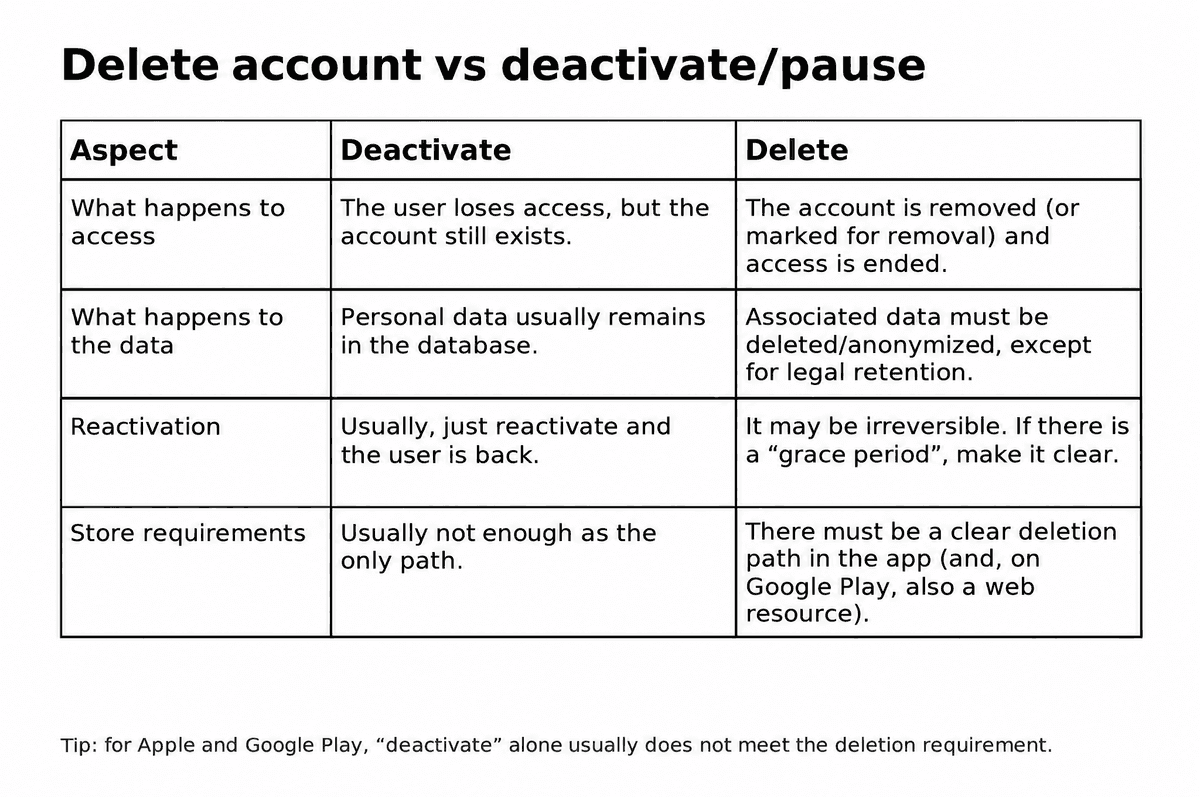
Rule of thumb: if your screen only offers "deactivate account", you are probably not yet at "ok to publish".
Google Play requirements (what they check)
If the app lets the user create an account, Google Play usually requires three things:
- A path inside the app for the user to request deletion of the account and associated data
- A web resource where the user can also request deletion (useful for people who uninstalled the app or cannot access it)
- Correctly filling in the deletion questions in the Data safety form inside the Play Console
What causes rejection most often is not "having the button or not": it is the experience:
- The path must be easy to find (usually under Settings/Account)
- The web resource must load without errors, mention the app or company and make the deletion path obvious
- The user must be able to request deletion without being forced to reinstall the app
Practical tip: for the web resource, Google accepts options such as a form, opening a ticket and even a support email, but the more "direct and self-explanatory" it is, the lower the chance of rejection.
Apple requirements (what they check)
For apps that support account creation, Apple requires that the user can start the deletion inside the app.
What reviewers usually look at:
- The option must be easy to find (usually under Settings/Account)
- The flow must allow deleting the account and associated data (not just "deactivating")
- You can use confirmation or re-authentication (to prevent accidental deletion), but you cannot make the process "impossible"
- Forcing the user to call or send an email as the only path tends to be rejected (with exceptions in highly regulated industries)
- If deletion is not immediate, state the timeframe and confirm when it is done
Recommended in-app flow (step by step)
The best flow has two traits: it is easy to find and it is hard to use by mistake (without becoming red tape).
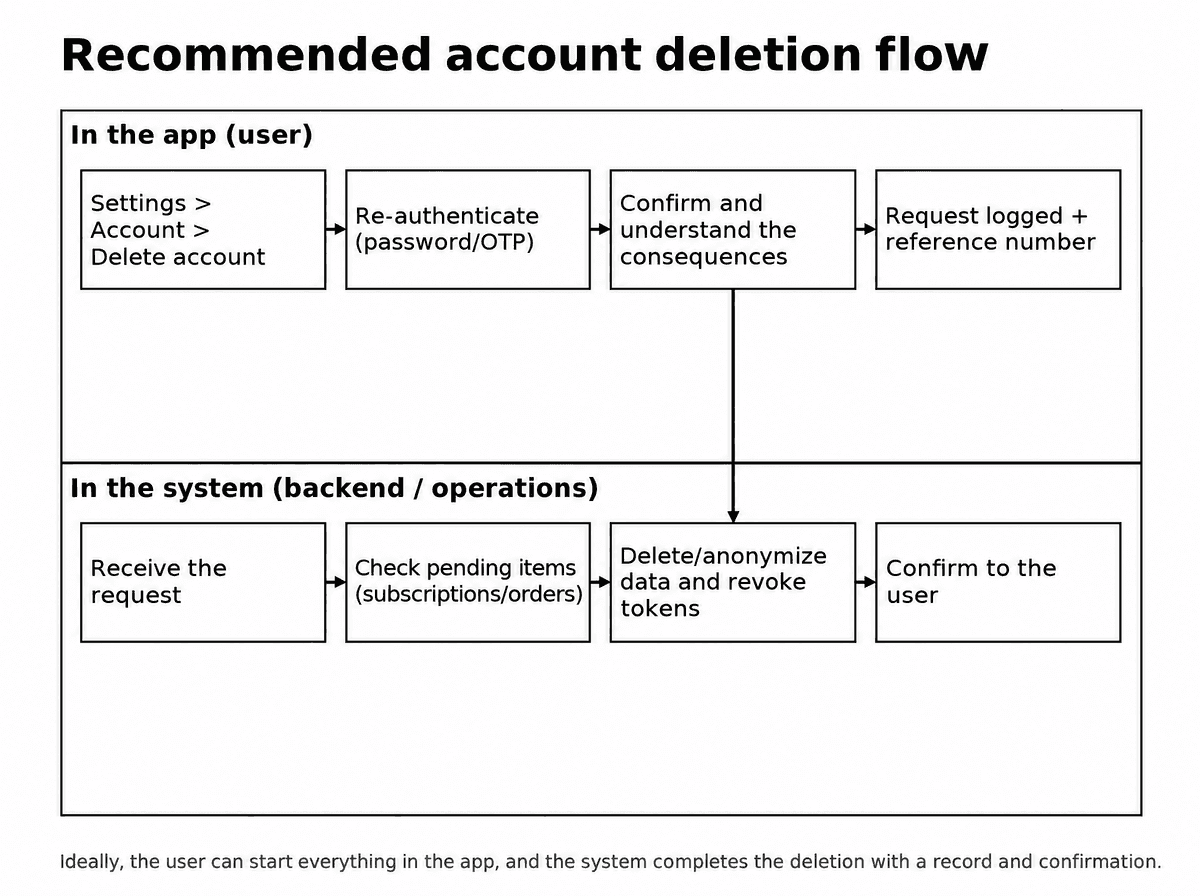
1) Put it in the "obvious" place
Suggested path (very standard):
Settings → Account → Privacy → Delete account
Avoid hiding it under "Help", "Support" or "Terms".
2) Explain what will happen (in plain language)
A good screen answers:
- What will be deleted (profile, personal data, history, user content, etc.)
- What may be retained due to legal obligations (e.g. invoices, anti-fraud records), if applicable
- Whether there is a timeframe to complete the deletion (when it is not immediate)
3) Confirmation + re-authentication (to prevent improper deletion)
Re-authentication is recommended when:
- the account involves sensitive data
- there are financial actions
- there is a risk that someone with an unlocked phone deletes the account
Simple options:
- confirm the password
- code by email/SMS
- biometrics (as an extra step)
4) Record the request (ticket number)
Even when deletion is immediate, it helps a lot to have:
- a status ("request recorded")
- a ticket number
- a contact channel (in case something goes wrong)
5) Final confirmation
When deletion is complete:
- confirm it in the app (if it makes sense)
- send a confirmation email (optional, but it reduces support questions)
Deletion web page (a minimal model that usually works)
Since Google Play asks for a web resource for deletion, you can create a simple page on the company website with:
- A clear title: "Delete your account in app X"
- A summary of what will be deleted
- A button or form to start the request
- E.g. enter the account email/phone + optional reason
- An explanation of timeframes ("we will complete it within X days") and legal retention exceptions, if any
- An alternative channel (support) only for failure cases
What matters is: the user must be able to start the request there, without reinstalling the app.
What needs to exist in the backend and internal process
This is where many apps "break" and end up rejected (or turn into an endless cost).
1) Data mapping (the part that prevents "leftover data")
Before implementing, answer internally:
- Where does the user data live? (main database, analytics, CRM, support, storage)
- Which integrations receive this data? (email, SMS, payments, anti-fraud)
- Is there cached data? Is there data in backups?
- What must be deleted, what must be anonymized and what must be retained due to legal obligations?
This becomes a "deletion map" (a simple list, per system).
2) Real deletion (not just "soft delete")
A robust flow usually does the following:
- Revokes sessions and tokens (including social login when applicable)
- Removes personal data from the database (or anonymizes it)
- Removes files from storage (e.g. photos)
- Unlinks the user from reports and BI (keeping only aggregated data)
- Triggers deletion at providers and third parties when they process user data
3) Operations: who handles it, how fast, and how do you prove it?
You need to be able to answer:
- Who receives the request (support? DPO? technical team?)
- What the completion SLA is (e.g. within X days)
- How you prove internally that the account was deleted
- How you handle special cases (subscriptions, open orders, chargebacks)
Tip: a minimal routine (ticket + checklist) prevents "everyone doing it their own way".
Ready-made checklists
Per-app checklist (product)
- The "Delete account" button is under Settings/Account (easy to find)
- There is a clear explanation of what will be erased
- There is confirmation (and, when needed, re-authentication)
- The flow does not become "endless red tape" (many steps for no reason)
- The app states the timeframe if it is not immediate
- After deletion, the user can no longer log in
- User content (UGC) is handled correctly (removed or anonymized according to the rule)
Google Play checklist (Play Console)
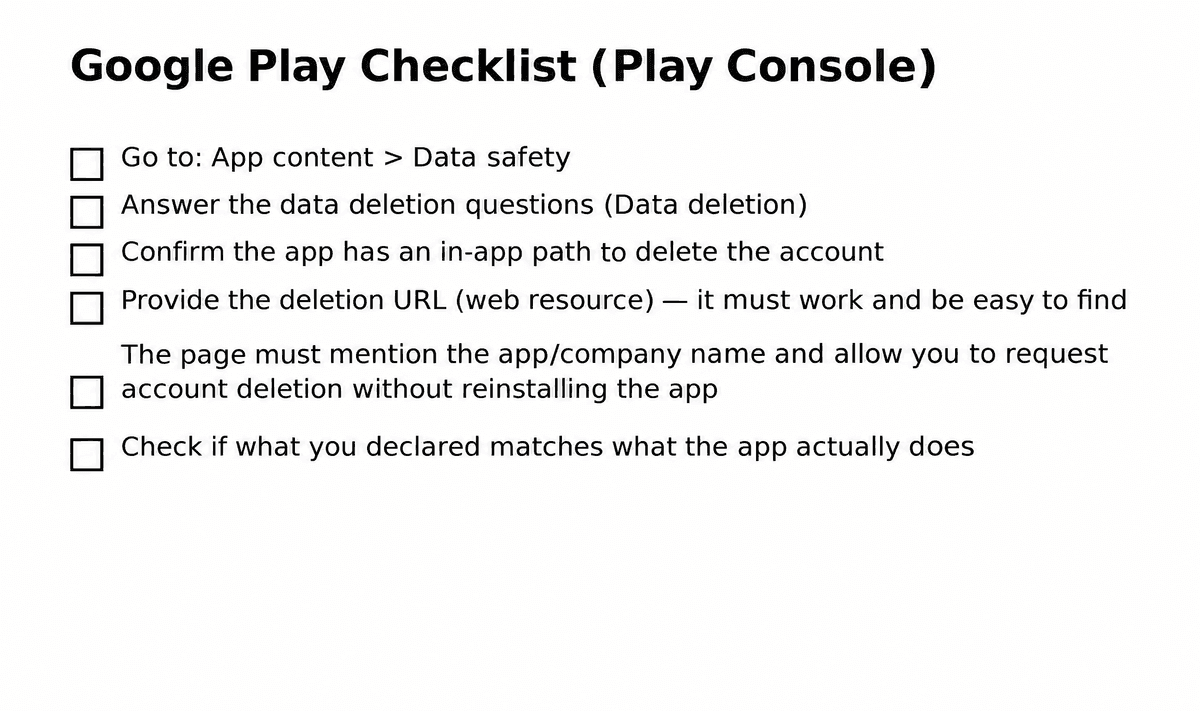
- "Data safety": deletion questions filled in and consistent
- The web resource URL works and makes it easy to request deletion without reinstalling the app
- The page mentions the app or company and makes the path obvious
- What was declared matches what the app actually does
Apple checklist (App Store)
- Deletion can be started inside the app
- "Deactivate" is not the only option
- The user is not forced to "contact support" as the only path (except in regulated scenarios)
- If part of the flow is on the website, there is a direct link to the right page
- If deletion is not immediate, timeframes and confirmation are transparent
Common mistakes that lead to rejection (and how to fix them)
- Only "Deactivate account" exists
Fix: offer real deletion (with removal or anonymization of associated data).
- "To delete, send an email" as the only path in the app
Fix: start it in the app. If you use support on the web resource, keep the page objective, with clear instructions.
- Broken or generic deletion URL
Fix: the page must load, mention the app or company and make the path obvious.
- The app says it deletes, but the user can log in afterwards
Fix: after deletion, authentication must fail and the data must actually be handled.
- Active subscription and the user is deleted without guidance
Fix: explain how to cancel and what happens to billing and renewal before deleting.
Where LGPD comes in (without legalese)
In practice, the user wants to "remove my account and my data from there". LGPD, Brazil's data protection law, recognizes data subject rights related to:
- deletion/elimination (in certain scenarios, such as when the legal basis is consent), and
- anonymization, blocking or deletion when processing is non-compliant or unnecessary.
At the same time, there are legal grounds under which data may be retained (for example, legal or regulatory obligations and other cases provided for in the law). What matters is: this must be clear to the user and organized in your process.
If your operation handles sensitive data, payments or tax history, involve your legal team to define:
- what can be deleted immediately
- what must be retained and for how long
- how to anonymize what is retained
If you are still preparing the store privacy declarations, see also: Privacy Policy, Data Safety and App Privacy: what to prepare before publishing your app.
Want to get your app approved without rework? Count on X-Apps
Implementing account deletion involves UX, backend, integrations, Play Console/App Store Connect and internal process. When it is done "in a rush", the cost comes back as rejection, urgency and support.
X-Apps can support your operation at this stage (and after launch) with fixes, continuous evolution and technical governance.
- Learn about the service: DevOps Operation
- Talk to the team: Request a quote / contact