Índice do artigofaltam 11 min de leitura
Short answer: for text RAG on the Cerebras public API, use
gpt-oss-120bwithreasoning_effort="low". In November 2026 the public catalog has only two models, and it is the cheapest, the fastest and the one with the highest throughput on the Developer plan. The other,qwen-3.8-27b, comes in when the RAG needs to read images.
Anyone searching for "best Cerebras model for RAG" usually finds comparisons with three, five or seven models, tables of tokens per second and a verdict along the lines of "it depends on your case".
The original version of this article, from August 2026, found a public catalog with three models, of which only gpt-oss-120b was in production. Since then the catalog has changed twice (details below), but the conclusion still stands: the choice is short, and the decision that really matters is in the pipeline.
The question stops being "which of the models" and becomes two others, which this article answers: why gpt-oss-120b is a good fit for RAG and, above all, what your pipeline needs for the infrastructure's speed to mean anything.
Because this is where almost every project gets lost: Cerebras speeds up one stage of RAG, and it is usually not the stage that is slow.
The public catalog in November 2026
| Model | Input | Context (trial / paid) | Price per 1M (input / output) | Declared speed |
|---|---|---|---|---|
gpt-oss-120b | Text | 65k / 131k | US$ 0.35 / US$ 0.75 | ~3,000 tokens/s |
qwen-3.8-27b | Text and image (PNG or JPEG) | 64k / 128k | US$ 0.99 / US$ 1.49 | ~1,850 tokens/s |
Three readings the table alone does not give you.
The catalog shrank and swapped one of its models. In August there were three models: gpt-oss-120b, gemma-4-31b and zai-glm-4.7. GLM-4.7 was retired on August 17, 2026, as announced. Gemma 4 31B left shared inference on September 3, 2026, and Cerebras itself named qwen-3.8-27b as its replacement. Both remain available only on dedicated endpoints.
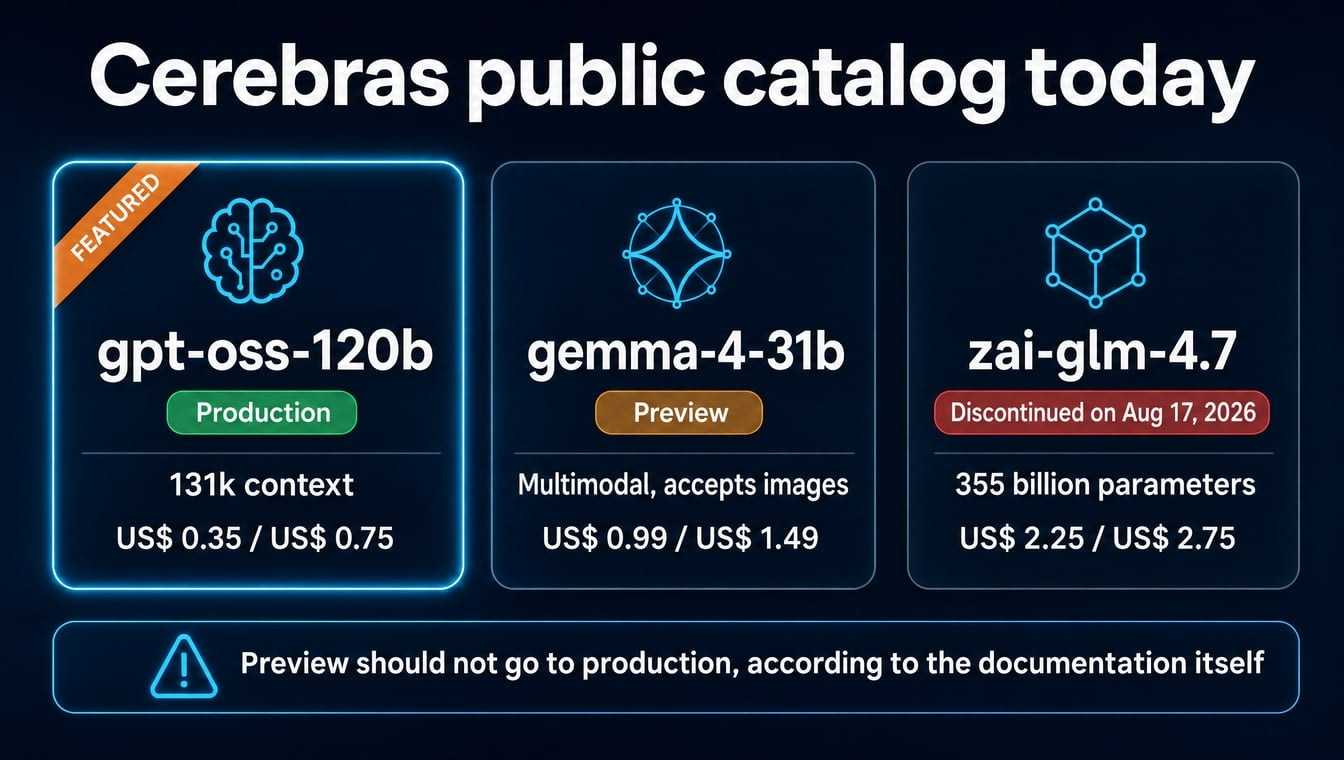
Catalog in August 2026, before GLM-4.7 and Gemma 4 31B left. The current catalog is the one in the table above.
The models page no longer marks "production" or "preview". In August, the two models other than gpt-oss-120b were marked as preview, for evaluation only. Today the catalog table has no status column, and the page points to dedicated inference for anyone who needs a production SLA. Since the deprecation history shows swaps every few months, confirm the status with Cerebras before locking in an architecture on top of either one.
Qwen is back in the public catalog, in another version. The public Qwen3-32B endpoint was discontinued on February 16, 2026, with gpt-oss-120b as the recommended migration, which is why the August version of this article said Qwen was not in the self-service catalog. Now it is, as qwen-3.8-27b: a dense 27-billion-parameter model, multimodal and with configurable reasoning. Llama remains outside the public catalog.
Why GPT-OSS-120B works well for RAG
It brings together four things that rarely appear together.
Cerebras positions it for reading documents. The model page describes it as suitable for processing long documents for question answering and summarization. In the model selection guide, it is the public catalog option on the summarization row and the conversational chat row. Note that there is no "RAG" row in that table, so no one can say "Cerebras recommends X for RAG". And the low-latency extraction row, which in August listed only gpt-oss-120b, now points only to Gemma 4 31B, available only on dedicated endpoints.
The architecture is economical by design. Despite the name, it has 117 billion total parameters with about 5.1 billion active per token, in a mixture of experts. You pay for inference on a small model with the repertoire of a large one.
Reasoning effort is configurable. It accepts reasoning_effort at low, medium and high, and the default is medium. For classic RAG, where the answer is already literally in the retrieved passages, low is the right setting: you are not asking the model to discover the answer, you are asking it to write it faithfully. Save medium and high for when the question requires cross-referencing documents or resolving a contradiction.
Two important caveats here. There is no none for this model: reasoning is always on and the floor is low. And reasoning tokens count as output tokens, which is the expensive rate, and they also consume max_completion_tokens. Leaving the effort at the default out of inertia is signing a blank check.
The price is the lowest in the catalog. US$ 0.35 on input and US$ 0.75 on output, against US$ 0.99 / US$ 1.49 for qwen-3.8-27b.
Speed: two true and different numbers
This blog covered the same point in the August 4, 2026 article about Cerebras, and the distinction still holds.
Cerebras publishes about 3,000 tokens per second for gpt-oss-120b. That number is not only in an old launch post: it is in the speed column of the model catalog, in the documentation current as of November 2026.
Artificial Analysis, which measures independently, recorded 1,851 tokens per second in August 2026, with 1.55 seconds to the first token, and said on its providers page that no provider came close to 3,000. In November, the same page shows 1.79 seconds to the first answer token at the high-effort setting and ranks Cerebras as the fastest of the 16 providers measured on time per task (0.9 minute). The current text of the page does not include a tokens-per-second figure.
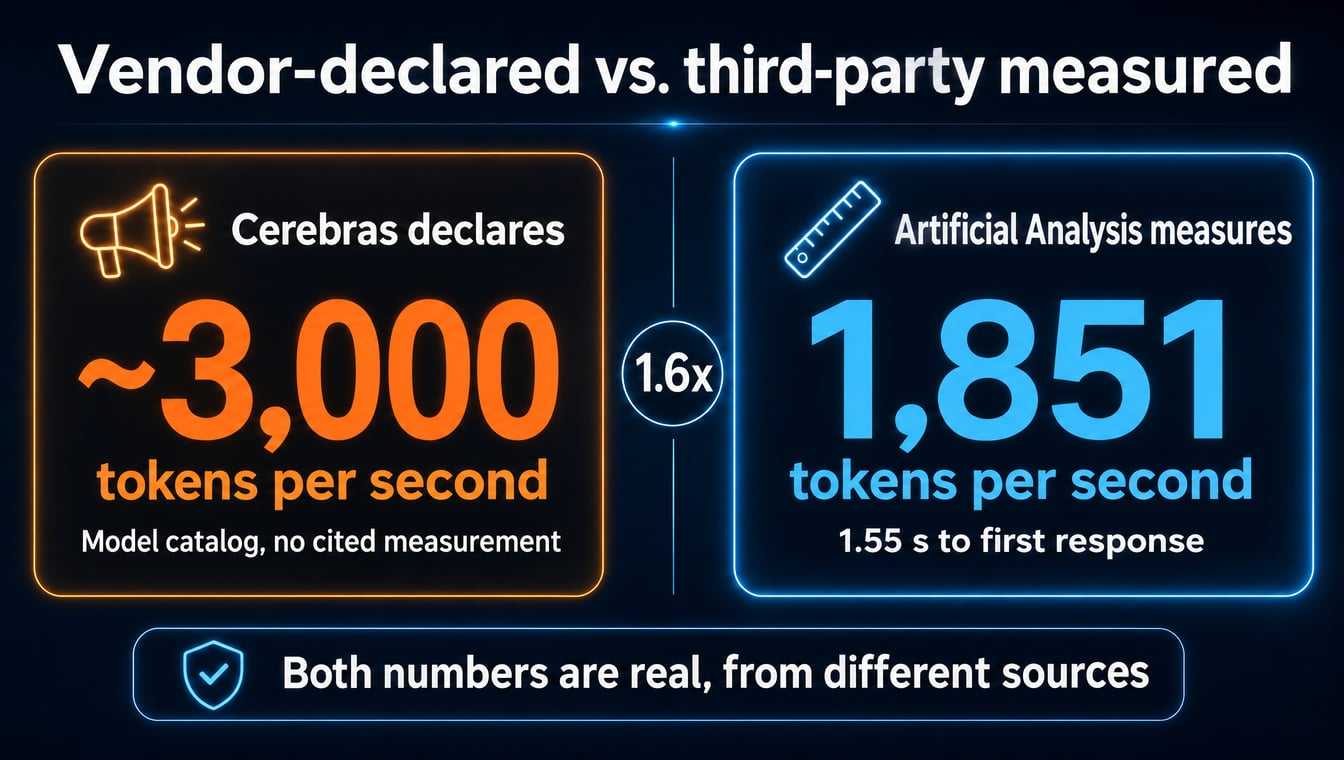
Both numbers are real and have different origins: one is a spec declared by the vendor, the other is a third-party measurement. An honest comparison shows both. To size capacity, use the measured one, and check the current value, because Artificial Analysis works with rolling medians.
And even the measured number is excellent: against the 50 to 400 tokens/s typical of GPU endpoints, it is still an order of magnitude of difference.
The math that matters: how much a query costs
Let's take a concrete corporate RAG scenario:
- 10,000 input tokens per query, adding up instructions, rules and the retrieved passages;
- 500 billable output tokens, already counting reasoning;
- 100,000 queries per month.
| Model | Cost per query | 100,000 queries |
|---|---|---|
gpt-oss-120b | US$ 0.003875 | US$ 387.50 |
qwen-3.8-27b | US$ 0.010645 | US$ 1,064.50 |
gpt-oss-120b is 2.75 times cheaper than qwen-3.8-27b. For a product with millions of queries, that adds up to tens of thousands of dollars a year.
A word of caution with Qwen: its reasoning is on at high by default. If you do not pass reasoning_effort="none" or low, the scenario's 500 output tokens easily become several thousand, and the cost difference grows far beyond 2.75 times.
The math covers only the generator's tokens. Left out are embeddings, file parsing, the vector database, reranking, networking and observability, which in many projects add up to more than the model itself.
About the "free plan": it does not exist. The documentation answers directly that there is no permanently free tier. What exists is a Free Trial with US$ 5 in credits that expire 30 days after they are granted, and it requires a verified payment method. The 1 million tokens per day cap is a trial throughput limit, not a renewable free quota.
The part nobody tells you: Cerebras speeds up the stage that was already fast
A RAG has two halves.
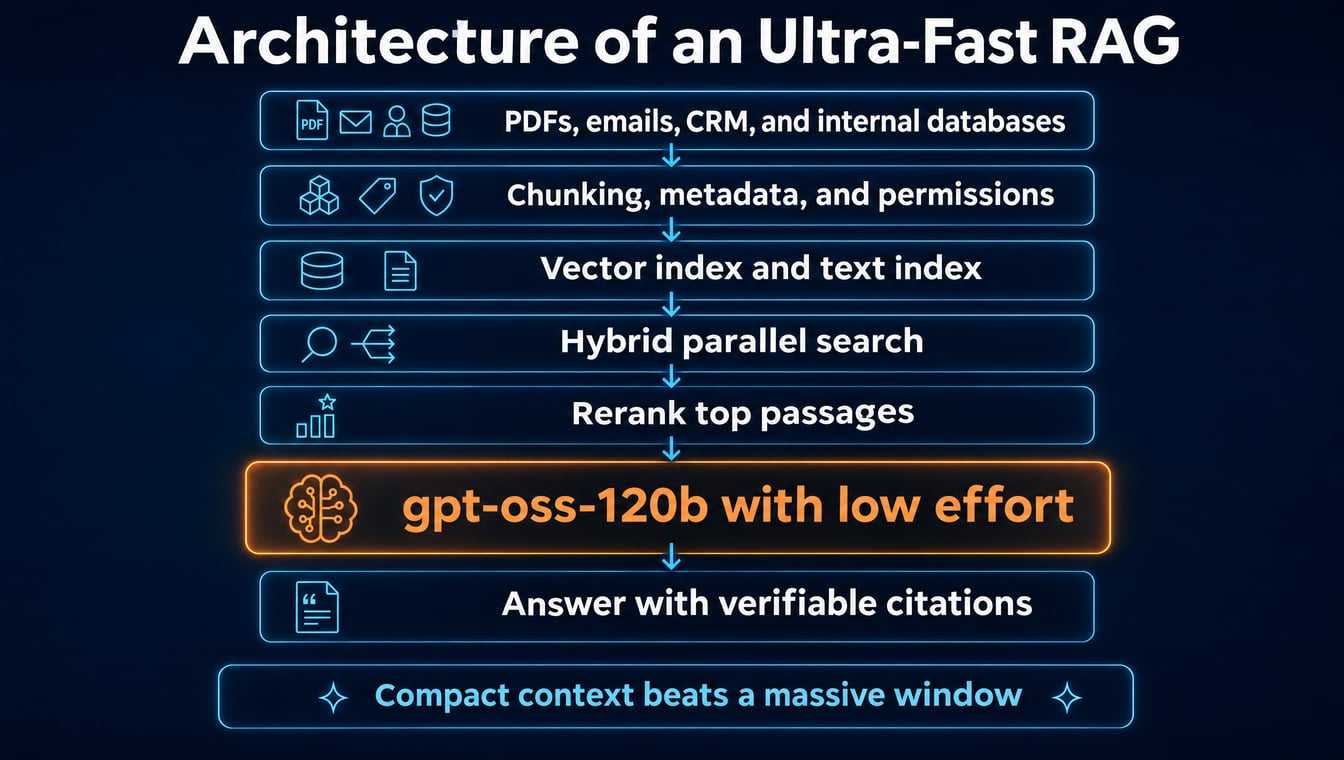
Retrieval goes from the question to the selected passages: vector search, text search, permission filters, reranking. Generation takes those passages and writes the answer.
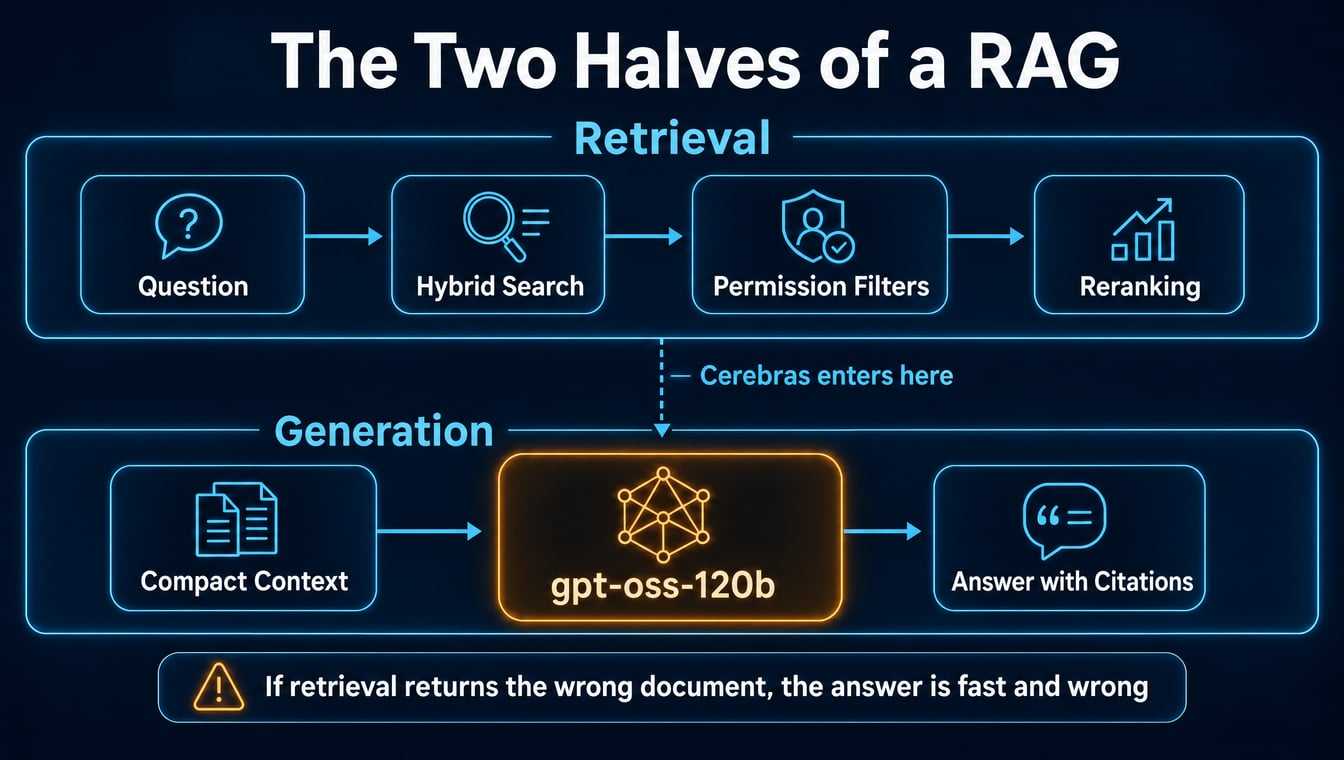
Cerebras runs only the second half. And here is the fact that changes the project: Cerebras has no embeddings endpoint. Its own documentation says it offers LLM inference, not embedding models. All retrieval is up to you, in Milvus, pgvector, Qdrant, Pinecone, Weaviate or whatever you choose.
Another practical detail: among vector databases, only Milvus has an official integration page. The others work, because the API is compatible with the OpenAI format, but you build it yourself.
Do the math with the measured number. At 1,851 tokens per second, a 500-token answer takes 0.27 second of generation. Add 1.5 to 1.8 seconds to the first token (the higher value was measured at high effort, and at low it tends to be lower) and you land between 1.8 and 2.1 seconds on the stage Cerebras speeds up.
Now ask how long the vector search, the reranking, the three calls to your permissions database and the rendering in the browser take. In most real pipelines, generation becomes the smallest slice of the chart.
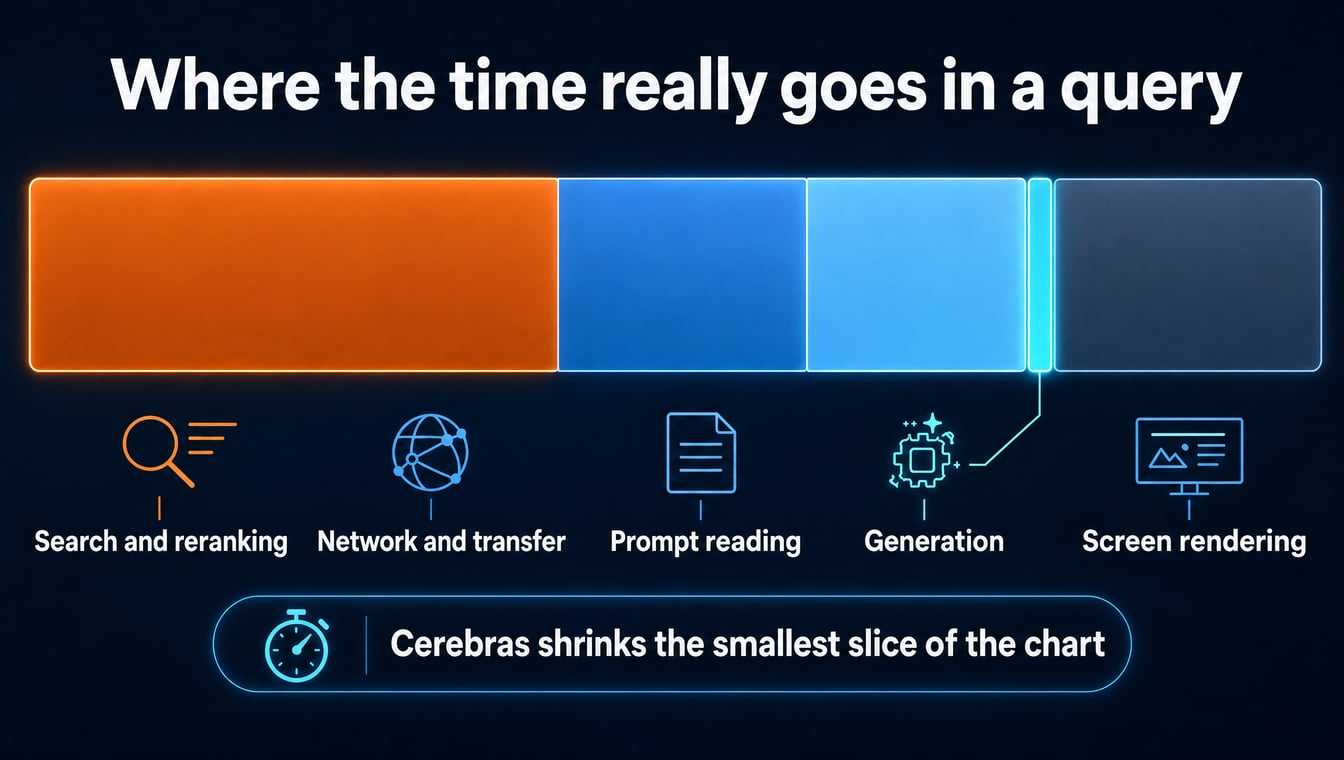
This does not diminish the platform's value, it flips the project's script: with generation solved, the bottleneck becomes your retrieval engineering. If the retriever brings back the wrong document, Cerebras will deliver the wrong answer faster than any competitor.
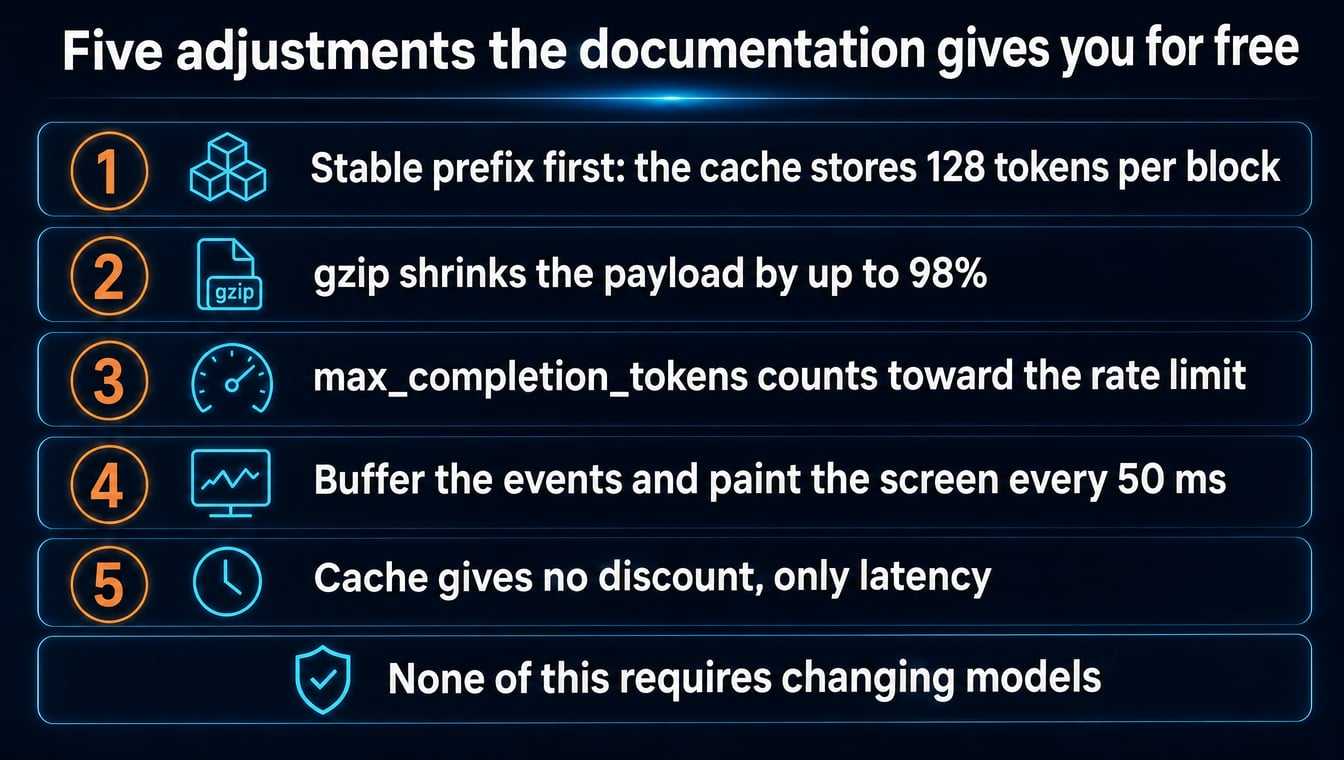
Five optimizations the documentation gives you for free
This is the part that separates those who read the documentation from those who read a comparison.
1. Order the prompt so the cache hits
Prompt caching stores identical prefixes in blocks of 128 tokens, with a guaranteed minimum retention of 5 minutes, and up to one hour. To take advantage of it, the start of the request must be byte-for-byte identical across calls. The right order is:
- stable system prompt;
- answer and format rules;
- tool schemas;
- citation instructions;
- retrieved context (changes with each query);
- user question (always changes).
A trap: the cache gives no discount at all, tokens are billed at the full input rate. The gain is in latency and throughput, as item 5 shows. The good news is that caching is now on by default for all models on the platform, including qwen-3.8-27b. In August, Gemma 4 31B was the exception without caching.
2. Compress the payload with gzip, not with MessagePack
The platform accepts gzip and MessagePack. In the official table, measured on a chat payload of about 50,000 tokens, compression gets close to 98%.
The detail lost in a quick read: gzip is what delivers the 98%. MessagePack alone yields up to about 5% on a chat payload, because natural text is still text after it becomes binary. In RAG, where you send tens of thousands of context tokens, gzip visibly shortens the time to the first token.
3. max_completion_tokens is not just a ceiling, it is a rate limit budget
This is the least known item and the most expensive to ignore.
The Cerebras rate limit is applied before processing, by estimate: it adds the prompt's input tokens to the max_completion_tokens you declared. If you ask for 4,000 output tokens for an answer that will have 400, the remaining 3,600 are reserved from your quota until the request finishes, and it is that reservation that triggers the 429 error. The quota is adjusted to actual usage after processing.
For corporate RAG, a ceiling between 300 and 700 tokens is usually enough and frees up real throughput. Remember that, on gpt-oss-120b, reasoning also comes out of that ceiling.
4. Do not let the browser be the bottleneck
The platform sends about 200 SSE events per second, and each event can carry several tokens. If your frontend renders Markdown on every event, the interface becomes slower than the model, and the user will blame the AI.
The official recommendation is to batch events and update the screen at a short interval, such as 50 milliseconds. And to use streaming selectively: for answers below about 200 tokens, the full answer arrives so fast that streaming barely helps. Note that the guidance is selective use, not a ban.
The same guide, which in August used zai-glm-4.7 in its code examples, now uses qwen-3.8-27b. If you copied the old code, change the model name.
5. Know your real throughput ceiling
Cerebras applies two tokens-per-minute limits at the same time: one for uncached tokens and another for the total, which by default is three times the first. Tokens served from the cache do not count toward the uncached limit.
| Plan and model | Uncached tokens per minute | Total tokens per minute | Requests per minute |
|---|---|---|---|
Developer, gpt-oss-120b | 1 million | 3 million | 1,000 |
Developer, qwen-3.8-27b | 150,000 | 750,000 (temporary increase; the default is 450,000) | 300 |
| Free Trial, each model | 30,000 | 90,000 | 5 |
On Developer there are no hourly or daily limits. On the Free Trial, the Cerebras limits page shows a cap of 1 million tokens per hour and per day. The documentation contradicts itself here: the gpt-oss-120b page shows other numbers for the Free Trial (30 requests and 60,000 input tokens per minute, 1 million tokens per day). The table follows the limits page, which is the most detailed; the value that applies to your account appears under Limits, in the Cerebras console.
With a RAG query adding up to about 10,500 tokens and no cache hits, gpt-oss-120b on Developer hits the uncached token ceiling at around 95 queries per minute. The cache only changes that ceiling when most of the query repeats. If two thirds of each query come from the cache (a long fixed prefix, like an entire manual repeated in every call), the binding limit becomes the 3 million total, close to 285 queries per minute. In a RAG like the one in item 1, where only the system prompt, rules and tools repeat and the retrieved context changes with each query, the gain is much smaller and the ceiling stays around 95 to 120 queries per minute. On qwen-3.8-27b, the same calculation without cache gives about 14 queries per minute, and that is another reason to keep Qwen only for the pages that need images.
How to avoid hallucination without switching models
In RAG, switching models is the least efficient lever. These weigh more:
Answers restricted to the sources. The prompt needs to explicitly forbid outside knowledge and require an "insufficient information" answer when there is no evidence.
Verifiable citations. Each passage gets a stable identifier. After generation, the application checks that every citation used exists in the context sent. It is cheap and catches an entire class of errors.
A relevance floor. If search and the reranker do not reach a minimum score, do not push weak passages just to produce some answer.
After-the-fact verification. For a critical answer, a second short call checks whether each statement holds up and whether the numbers match. In legal, financial or health areas, this does not replace human review.
When to leave the public API
Dedicated endpoints make sense when you need reserved capacity, isolation, predictable latency, your own weights or a model that is not in the public catalog. In November 2026, the dedicated inference page lists 15 model vendors, including Kimi, Qwen, GLM, MiniMax, DeepSeek, Gemma, Llama and Mistral, plus the option of uploading your own fine-tuned weights. That is where Gemma 4 31B and GLM-4.7 ended up after leaving the public catalog.
A caveat for anyone budgeting: the dedicated endpoints page does not publish an SLA number, neither uptime nor guaranteed latency. It talks about prioritizing requests to meet the customer's SLA, which is different from a numerical commitment. That is something you negotiate.
Verdict
For text RAG on the public API: gpt-oss-120b with reasoning_effort="low". Not because it won a comparison, but because it is the cheapest, the fastest, the one with the highest throughput on Developer, and the documentation positions it for question answering over long documents.
If your RAG needs to see: scanned documents, tables with layout, screenshots. That is where qwen-3.8-27b comes in, accepting PNG or JPEG images (up to 2 per request on the Free Trial and up to 10 on Developer). Honest caveats: it costs about 2.75 times more, has about one seventh of the uncached token limit of gpt-oss-120b and comes with reasoning at high by default. The efficient architecture is not to use Qwen for everything, it is to extract the text and route to it only the pages where the layout carries meaning. Until August, that role belonged to Gemma 4 31B, which left the public catalog on September 3, 2026.
What not to do: keep code pointing to zai-glm-4.7 or gemma-4-31b on the public API. GLM-4.7 was retired on August 17, 2026 and Gemma left shared inference on September 3. Anyone still depending on one of them needs to migrate to the current catalog or negotiate a dedicated endpoint.
And the conclusion that is worth more than the model choice: Cerebras solves generation, and generation is probably not your problem. With it, a well-built RAG answers almost at the speed of a traditional search. A poorly built RAG just gets things wrong faster.
If you want to discuss this applied to your document base, talk to our team about AI agents for companies.
Further reading:
- Fast, cheap and good: how to choose the AI that serves your customers
- RAG in practice: a guide to a chatbot with a knowledge base
- Sensitive data in RAG: privacy, redaction and access control
- Regression testing for prompts and RAG
- LLMOps: AI metrics, logs and evals in production
Published on August 5, 2026. Catalog, prices, limits, caching, reasoning and deprecations reviewed in the official Cerebras documentation on November 11, 2026. Artificial Analysis speed measurements are rolling medians: the tokens-per-second value cited is from August 2026 and the time to the first token was checked in November. Cerebras changes its public catalog frequently: confirm the model's status before locking in an architecture.