Índice do artigofaltam 3 min de leitura
In generative AI, "a small prompt tweak" can break 10 things without anyone noticing.
Regression testing is the handbrake.
AI regressions happen for reasons that don't exist in traditional software:
- you switched the model (or the version)
- you changed the prompt (even a single sentence)
- you changed the chunking/embeddings in RAG
- new content entered the knowledge base
- you added a tool (tool calling)
Without a test suite, you find the problem when the user complains, and by then it's too late.

What you will learn
- What to test in prompts, RAG, models and tools
- How to build a case dataset (without exposing sensitive data)
- How to define objective criteria (and when to use LLM‑as‑judge)
- How to compare against a baseline and block regressions
- Final checklist + references
The big picture (regression pipeline)
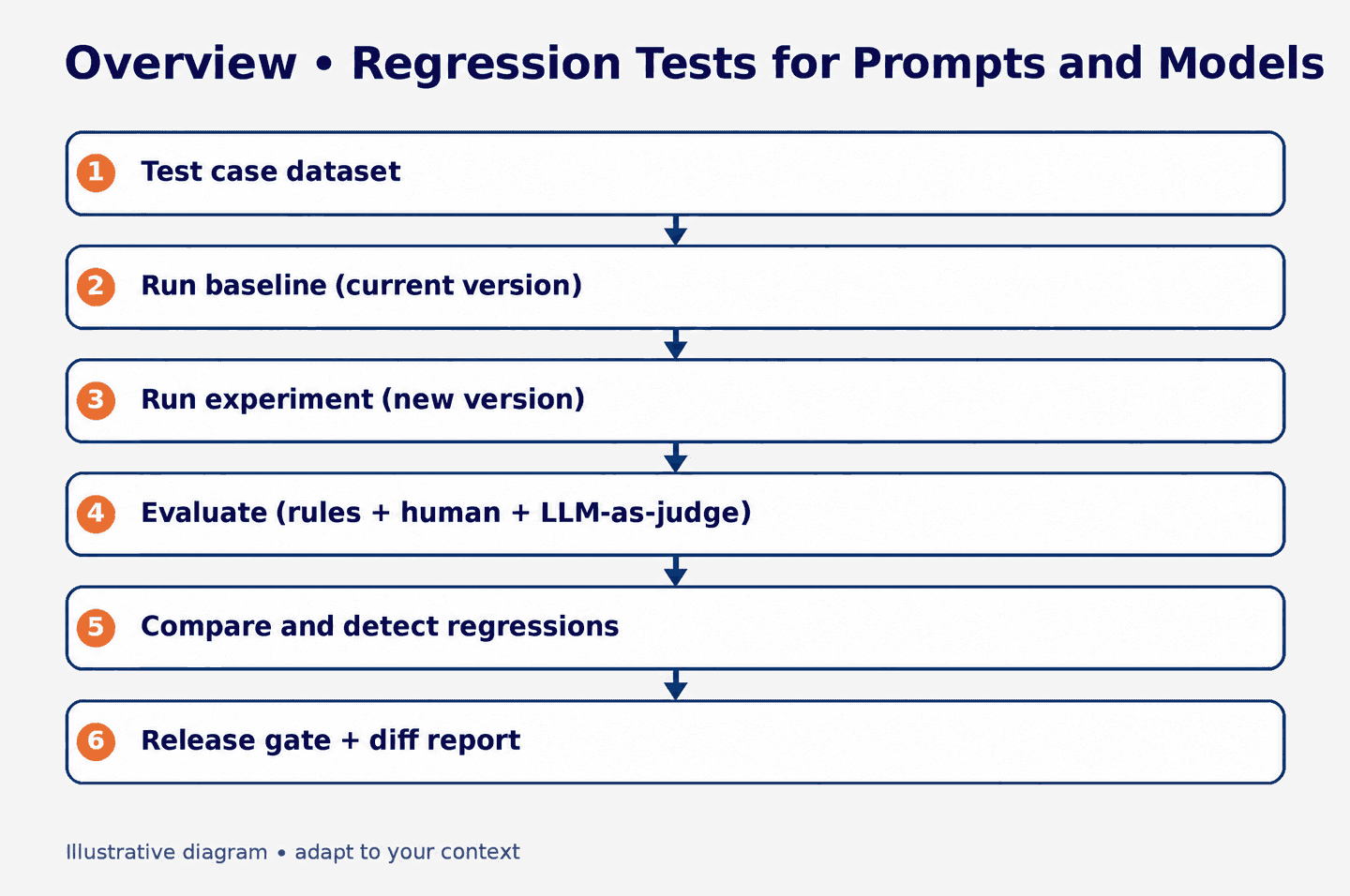
Think of it as CI for AI: if the change makes things worse beyond the acceptable limit, it doesn't ship.
1) Start with a small, realistic dataset
A "good enough" dataset already works with 30–100 cases, as long as it is representative:
- frequent support questions
- critical cases (financial, security, privacy)
- questions that tend to trigger hallucinations
- cases where the answer must cite a source (RAG)
Tip: collect cases from logs, but redact PII (or generate synthetic cases with the same structure).
If your system uses RAG, include in each case:
- the user's question
- the expected context (category, product, tenant)
- which sources should be retrieved (when it makes sense)
2) Define "what good looks like" with clear criteria
Avoid criteria that are too subjective ("it got better").
Useful criteria:
- correct / incorrect (when an answer key is possible)
- completeness (did it answer what was asked?)
- format (valid JSON? a list? up to X lines?)
- safety (no data leaked, no policy ignored)
- in RAG: did it cite a source? is the source relevant?
A case template (simplified):
id: "faq-012"
input: "How do I reset my password?"
expected:
  must_include:
    - "step"
    - "email"
  must_not_include:
    - "user's current password"
  rag:
    should_cite: true
    expected_sources_any:
      - "help-center/password-reset"
3) Choose evaluators (rules + human + LLM)
You can combine:
- code rules (regex, JSON schema, presence/absence of terms)
- human review (a small, frequent sample)
- LLM‑as‑judge (one model evaluating another), with care
LLM‑as‑judge works well for:
- comparing two answers (A vs B)
- scoring simple criteria with a rubric
- evaluating style and completeness
But it has risks:
- it can be unstable between runs
- it can be swayed by "nice-sounding text"
- it can get facts wrong
That's why you should use it as a signal, not as the only judge. And keep a human sample.
4) Compare against a baseline (the part that prevents guesswork)
The pattern that works:
- pick a baseline version (prompt/model/config)
- run the dataset
- run the new version
- compare scores and diffs
- approve/reject with thresholds
Example gates:
- "hallucination cannot increase by more than 2%"
- "answers with a source in RAG must stay ≥ 90%"
- "invalid JSON must be 0%"
- "p95 latency cannot get worse by > 15%"
5) Run it in CI and version everything
Version:
- the prompt (and templates)
- the RAG configuration (chunking, top‑k, rerank)
- the model and parameters (temperature, max tokens)
- the test dataset
And run it on:
- PRs that touch prompt/RAG/tools
- model upgrades
- relevant data changes (large reindexing)
This becomes part of LLMOps: LLMOps: metrics, logs and evals.
Common mistakes in AI testing
- A dataset that is too "pretty" (only easy cases)
Result: it passes the test and breaks in the real world.
- Not testing security/privacy
Result: a silent leak regression.
- Relying only on LLM‑as‑judge without validation
Result: a false sense of quality.
- Not versioning data/configs
Result: you can't reproduce what happened.
Final checklist
- Dataset with real cases + critical cases + adversarial cases
- Objective criteria (rules) + a recurring human sample
- Threshold gates (quality, safety, latency, cost)
- Automatic baseline comparison + diff report
- Versioning of prompt, model, RAG config and dataset
- CI runs for relevant changes
- Logs and traceability to investigate regressions