Índice do artigofaltam 3 min de leitura
The difference between "useful AI" and "dangerous AI" is usually: who validates the action.
Tool calling is only good when the application stays in control.
Tool calling (also called function calling) is the pattern where the model does not "execute" anything on its own. It asks the application to run a tool (API, search, calculation, query) and returns a structured payload (usually JSON). The application validates it, runs it, returns the result, and the model finishes the answer.
In other words: the LLM becomes an orchestrator, and your backend remains the source of truth.

What you will find here
- How tool calling works (basic flow)
- When to use it (and when not to)
- How to design tools that do not become an attack surface
- Security and audit: authorization, validation and logs
- Final checklist for going to production
The basic flow, step by step
The typical flow is this (with variations by vendor):
- your application calls the model and describes which tools exist
- the model replies with a "tool call" (name + parameters)
- your application runs the tool (real code)
- your application returns the result to the model
- the model answers the user (or makes new tool calls)
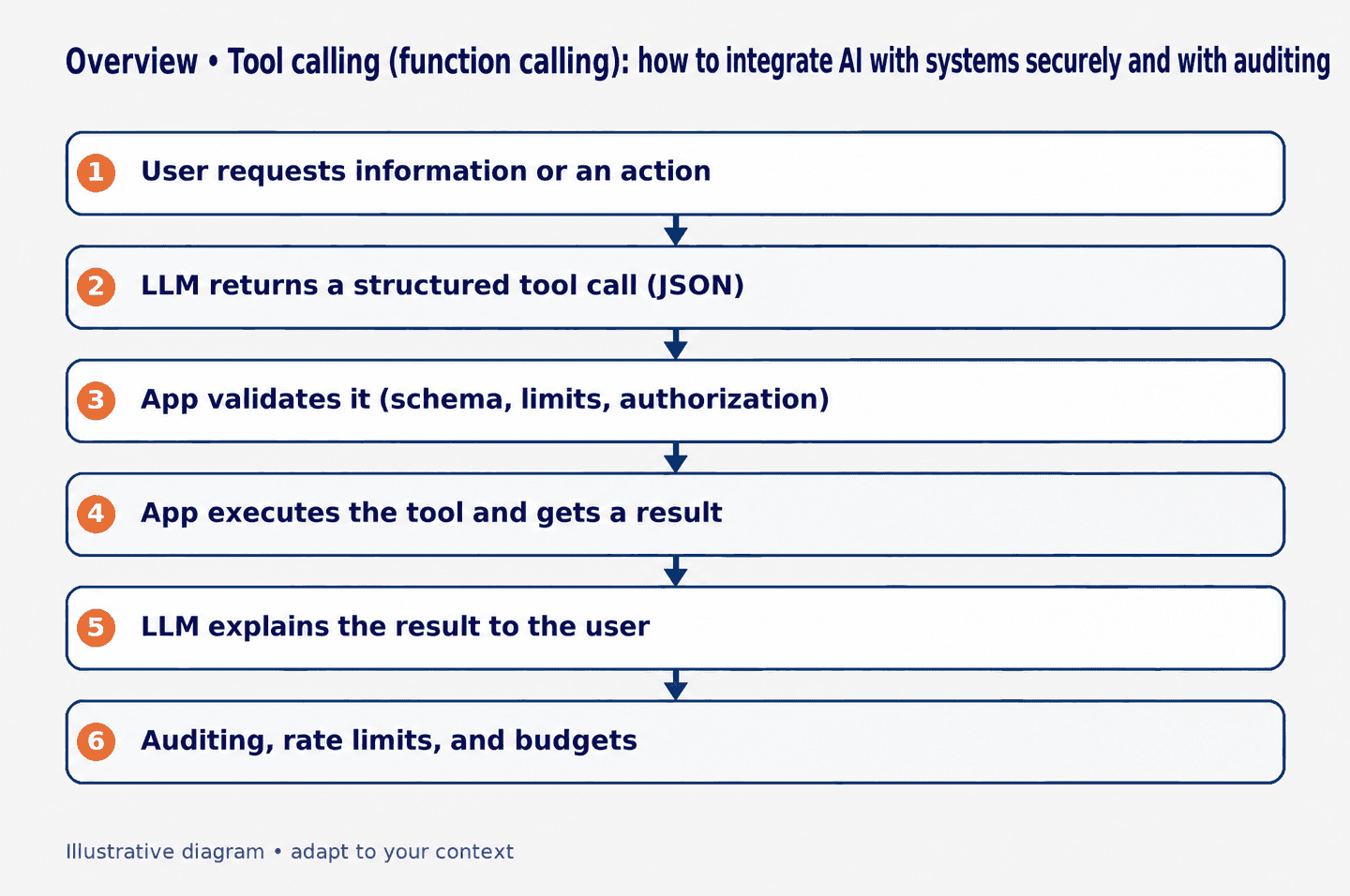
This pattern shows up in documentation from OpenAI and other providers precisely because it separates "generated text" from "real action".
When tool calling is the right choice
Use tool calling when you need to:
- query up-to-date data (inventory, status, internal data)
- run calculations or deterministic rules
- call external APIs (maps, payments, CRM, ERP)
- turn text into structures (extract fields as JSON, for example)
- build automations with traceability
Avoid tool calling when:
- the task is only writing or summarizing, with no dependence on external data
- the risk of the action is high and you do not have governance yet (better to start read-only)
- you want "an assistant that does everything" (that tends to become excessive agency)
The golden rule: a good tool is a small tool
A tool with a very broad scope ("run any command", "run any query", "send any email") creates unnecessary risk.
Patterns that help:
- specific tools (e.g.
get_order,list_products,generate_pdf_report) - parameters with types and enums
- limits (pagination, maximum size, date windows)
- lean results (only what is needed to answer)
Conceptual schema example (simplified):
{
  "name": "get_order_status",
  "description": "Returns the status and events of the authenticated user's order",
  "parameters": {
    "type": "object",
    "properties": {
      "order_id": { "type": "string" }
    },
    "required": ["order_id"],
    "additionalProperties": false
  }
}
Notice the "authenticated user": authorization cannot depend on the model.
Security: where most teams get it wrong
1) Authorization happens in the backend ("complete mediation")
Even if the model "seems to obey", authorization must happen in the API.
- The model does not decide whether it can access data.
- The model does not decide whether it can perform an action.
- The backend applies rules per user, role, tenant and context.
This also improves audit and compliance.
2) Input validation (do not trust the model's JSON)
Even with a schema, treat it as untrusted input:
- validate types, ranges, enums
- reject unexpected fields (
additionalProperties: false) - apply limits (e.g.
limit <= 50) - normalize strings and dates
3) Idempotency and human confirmation for critical actions
If the tool does something irreversible (cancel, delete, publish), good practices are:
- require explicit confirmation from the user (human-in-the-loop)
- use idempotency keys (so nothing is repeated by accident)
- keep an audit trail (who asked, when, what was done)
This ties into risks like "excessive agency" (an LLM doing too many things with too much autonomy).
4) Logs and observability
To operate with confidence, log:
- the tool called + parameters (with PII redaction)
- execution time and errors
- origin (which conversation, which user)
- summarized result (IDs, not sensitive data)
If you have not structured this yet, it is worth reading: LLMOps: metrics, logs and evals.
How tool calling connects with RAG and security
Tool calling and RAG are complementary:
- RAG helps answer "what is it / how does it work" based on documents
- tools help answer "what is the status / what is the current data" from the source of truth
Watch out for:
- tool output is also input to the LLM (treat it as untrusted)
- RAG documents may contain malicious instructions (indirect injection)
Related reading:
Final checklist
- Tools with a small, objective scope
- Strict schema (types, enums,
additionalProperties: false) - Authorization enforced in the backend (per user/tenant/role)
- Full input validation and usage limits
- Human confirmation for critical actions
- Logs/audit of tool calls (with redaction)
- Rate limits and budgets to prevent abuse and runaway cost
- Regression tests with adversarial cases (jailbreak, prompt injection)
References
- OpenAI: Function calling / tool calling
- OWASP GenAI: Excessive Agency
- OWASP Top 10 for LLM Applications
When the agent needs to query or trigger real systems, see the page on AI integration with APIs, plus the pages on AI integration with ERP and CRM and MCP to standardize tools and workflows.